Billing and invoices
How your monthly bill is worked out, what each line on an invoice means, and where the per-bot breakdown and PDF live.
Every month, Kooday works out what you owe for the calls, chats and add-ons your assistant handled, and turns it into a proper GST invoice — the kind your accountant can file, not just a number on a dashboard. This page explains how to read one.
An invoice is worked out once a billing period closes, not continuously. The figures on the Billing page move as calls come in. The invoice for a closed month is prepared from that period’s usage, and once it has been issued and numbered its total is fixed — it will not change if you look again a week later.
Your billing month runs from your renewal date
Your billing month is not the calendar month. It runs from your renewal date — the same day every month, set when you signed up and shown at the top of the Billing page — to the day before the next one. If your renewal date is the 18th, your July invoice covers 18 June to 17 July.
Everything renews together on that date: your plan and every add-on, on one invoice, one payment.
Why not the 1st of the month? Because everyone renewing on the same day is fragile. The first few days of the month are the busiest in Indian banking — salaries, EMIs, SIPs, utility payments — and one problem there would hold up every customer’s payment at once. Spreading renewal dates across the month means a problem affects a handful of accounts rather than all of them.
If your renewal date is the 29th, 30th or 31st, months that are shorter than that use their last day instead: a 31st renewal date falls on 28 February, and then goes back to 31 March. It never drifts forward.
Anything added or stopped part-way through is charged for the part of the month it was there — see Buying an add-on.
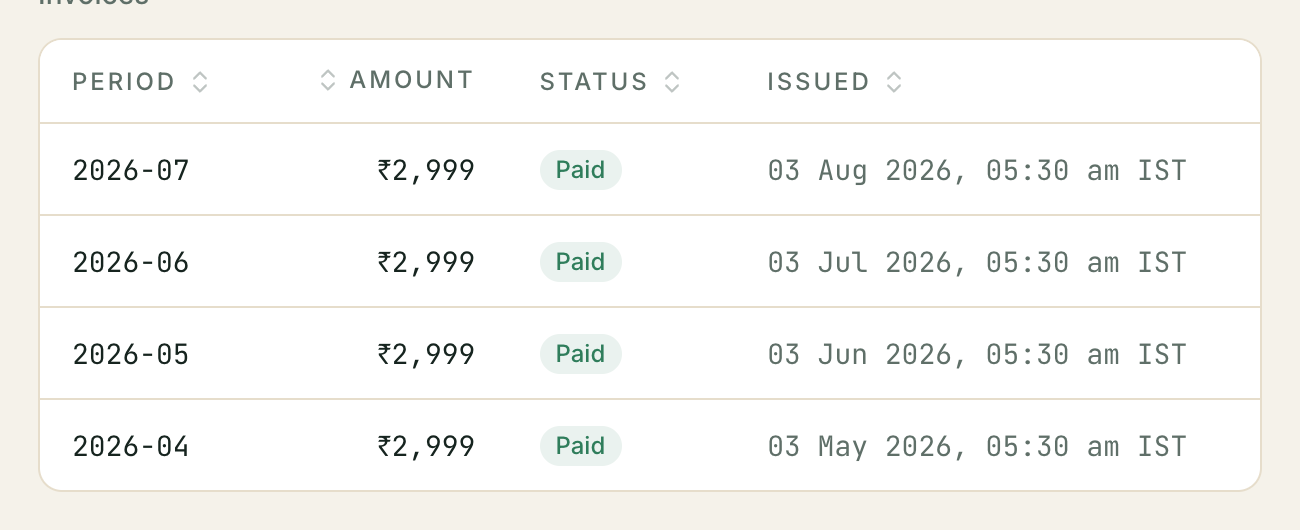
Where to find it: open Billing in your dashboard. Your current period’s usage is at the top, your billing details in the middle, and your invoices are listed below them — Period, Amount, Status, Issued. Click any row to open the invoice itself.
If you signed up yourself, you’re probably on a trial, not a paid plan. A trial’s base fee is ₹0 and it does not meter a per-minute rate, so there is nothing to invoice while you’re on one. See Creating your account for exactly what a trial includes and how to move to a paid plan when you’re ready.
What’s on an invoice
An invoice has one line per kind of usage, split by the assistant that did the work — and, for chat, by the channel it happened on. A busy month can mean thousands of calls; nobody wants a thousand-line PDF, and the detail behind each number is always one click away on your Calls and Inbox pages.
Subscription — Growth                                         ₹4,999.00

AI voice calls — Front desk                  230 min          ₹1,196.00
  average ₹5.20 per min · included 200 · billable 30 · bot: frontdesk
Included with Growth                         200 min         −₹1,040.00
  average ₹5.20 per min · included 200 · billable 0

AI chat sessions (whatsapp) — Front desk  412 session           ₹407.88
  average ₹0.99 per session · included 0 · billable 412 · bot: frontdesk · channel: whatsapp
AI voice notes (whatsapp) — Front desk     38 note               ₹76.00
  average ₹2.00 per note · bot: frontdesk · channel: whatsapp

Add-ons
  Web widget                                                    ₹499.00
  AI pipeline                                                 ₹1,499.00
                                              ─────────────────────────
                                    Subtotal                  ₹7,636.88
                                    Taxable amount            ₹7,636.88
                                    CGST @ 9%                   ₹687.32
                                    SGST @ 9%                   ₹687.32
                                    Round off                     ₹0.48
                                    Total                     ₹9,012.00
Each allowance line sits directly under the usage it discounts, so voice and chat each get their own.
| Line | What it covers |
|---|---|
| Subscription | Your plan’s monthly base fee, at full price. |
| Included with … | Your plan’s included allowance, taken off as its own negative line. Usage above is priced in full first, then the allowance is discounted once — so you can see what the allowance was actually worth this month instead of inferring it from a smaller number. |
| AI voice calls | The period’s calls, one line per assistant. Calls that could not be tied to an assistant get their own line reading not attributed to a bot. |
| AI chat sessions | WhatsApp, web-chat, Instagram and Messenger conversations, one line per assistant and channel. |
| AI voice notes | Voice notes sent through chat, billed separately from text sessions. |
| Add-ons | Any paid capability on your account — the web widget, the AI pipeline, and so on. If it was active for only part of the period you are charged for those days, though the invoice shows the charge rather than the day count. |
The small grey line under each entry is where the working is: the per-unit rate, how much of your allowance the line used (included / billable), and which assistant and channel it belongs to.
The rate under a line is your plan’s rate for that usage. Multiply it by the quantity and you get the line’s amount — voice minutes and chat sessions are priced at a flat card rate, not at a figure that varies call by call. The one exception is voice notes, where the figure shown is the line’s total divided by the number of notes.
Lines that read ₹0 — “settled from wallet balance”
If your account runs on a prepaid balance, calls and campaign messages are paid for the moment they happen: the cost comes off your balance as each call ends and as each campaign message goes out. Your balance and its recent movements sit at the top of the same Billing page as your invoices — see Your prepaid balance for how topping up and running out actually work.
Those lines still appear on the invoice, so the document is a complete record of what your assistants did — but the amount reads ₹0.00 and the description says settled from wallet balance:
AI voice calls — Front desk — settled from wallet balance
                                             230 min              ₹0.00
  average ₹5.20 per min · included 0 · billable 230 · bot: frontdesk
The minutes and the rate underneath are the same figures your balance was charged at, so the two screens agree — the rate is what you paid per minute, not a share of the ₹0. The invoice then bills only what the balance did not already cover: your subscription, chat sessions, and any add-ons.
You are never charged twice for the same call. If you see a call priced on both your Wallet page and your invoice, that is a bug — please tell us.
Accounts that are not on a prepaid balance see the ordinary priced lines above and pay on the invoice as usual.
GST and the total
Kooday charges GST on every invoice, at 18% today. Two things decide how it appears:
- Your state vs Kooday’s registered state — if they match, you pay CGST + SGST, each shown on its own line at half the rate (CGST @ 9%, SGST @ 9%); if they differ, you pay IGST @ 18% instead. You never pay both.
- A final rounding to the nearest rupee. GST rules round the invoice total, and the paise difference shows up as a small Round off line, either up or down.
The place of supply used for that comparison is the one on your billing details — see My invoice has the wrong state on it.
If your account has no GSTIN on file, that’s expected for an unregistered business — you still get a valid invoice, it’s simply a B2C one.
The invoice number
An invoice gets its permanent number — KDY/2026-27/000123 — at the moment
it is issued, not when the period closes. The sequence never has gaps and
never reuses a number, which is what GST record-keeping requires, and the
year in the middle is the Indian financial year (April to March).
Until then the invoice exists but has no number, and a PDF downloaded at that point is stamped Draft — not yet issued. Its total can still change: a period that is re-costed before issue is rebuilt from scratch.
Where the money comes from
Your usage this period sits above the invoice list on the Billing page: total calls, completed, billable, talk minutes, tokens and billable cost, and — for accounts with a purchased minutes allotment — a bar showing how much of it you’ve used.
⚠️ This block is voice only. Chat sessions and voice notes are metered and do appear on the invoice, but they are not in the current-period figures, so the total you see here is not the whole of next month’s bill.
Invoices issue themselves
Once a billing period closes, Kooday issues and numbers the invoice automatically — nobody at Kooday has to do it by hand. The only thing that can hold an invoice back is your own billing profile: issuing needs a place of supply to work out the GST split, and without one there is nothing to build a taxed invoice from.
If your billing profile is incomplete, the Billing details card (above the invoice list) shows a GST state missing chip and a banner:
Complete your billing profile to enable automatic invoicing. Until a state is set, your invoices stay pending and are not issued automatically.
The period is still costed on schedule — you are not charged late or skipped — but the invoice stays Pending indefinitely until you fill in a state (or a Kooday admin issues it by hand as a one-off override). Filling in your Registered business name, state, or GSTIN clears the chip and the next period issues normally; it does not retroactively issue a period already stuck pending.
Statuses
| Status | Meaning |
|---|---|
| Pending | The period has been costed but the invoice has not been issued yet — either it is about to issue automatically, or your billing profile is incomplete and it is waiting on that (see above). The total can still change. |
| Issued | Finalised and numbered, automatically or by a Kooday admin as an override. The total will not change. |
Payment is settled with Kooday outside the dashboard; an invoice’s status is not a record of whether you have paid it.
Getting the PDF
Open an invoice and use Download PDF. It is the same document as the page you are looking at — your details and Kooday’s, every line, the GST split and the total — and it is the copy to give your accountant.
Troubleshooting
My invoice total doesn’t match what I expected
Check the lines first. Two things surprise people most often: usage is priced in full with the plan allowance taken off as its own negative line, so the usage lines look bigger than the amount you actually pay for them; and an add-on active for part of the period is charged for those days without saying so on the line.
If a line still looks wrong, the underlying detail is on your Calls and Inbox pages; every billed line traces back to real usage there.
There’s no GSTIN or company address on my invoice
Open Billing and fill in your billing details — legal name, GSTIN, state and place of supply, and the registered address. They are yours to edit, and they are read when the invoice is built, so correcting them fixes the next invoice rather than one already issued.
My invoice has the wrong state on it
Same place: the place of supply on your billing details decides whether you are charged CGST + SGST or IGST. If it is blank, your state code is used instead. Fixing it changes invoices built afterwards.
I didn’t get an invoice email
Invoice emails are opt-in and are set up by Kooday, not from the dashboard — contact support to have your account switched on and to say which address should receive them.
⚠️ Opting in does not send you the invoices you already missed. There is no resend, so if invoice email matters to you, ask for it before the first invoice rather than after.
Still stuck? We answer support mail the same working day.
Email support