Reading a campaign report
Deals and pipeline value first, who was left out and why second, the opt-outs it cost you third, delivered and read last — what each number counts, and why neither the delivery figures nor the opt-out count is ever final.
Most campaign tools show you a delivery percentage. It is the least useful true number in marketing: it tells you the message left, not that it worked.
A campaign report here is in four parts, in this order, and the order is the point:
- What this campaign produced — deals, pipeline value, replies.
- Who we sent to, and who we held back — every person left out, with the reason.
- Opt-outs this campaign caused — what the campaign cost you in permission.
- Delivery and reads — what Meta says happened. Last, and never final.
What this campaign produced
| Number | What it counts |
|---|---|
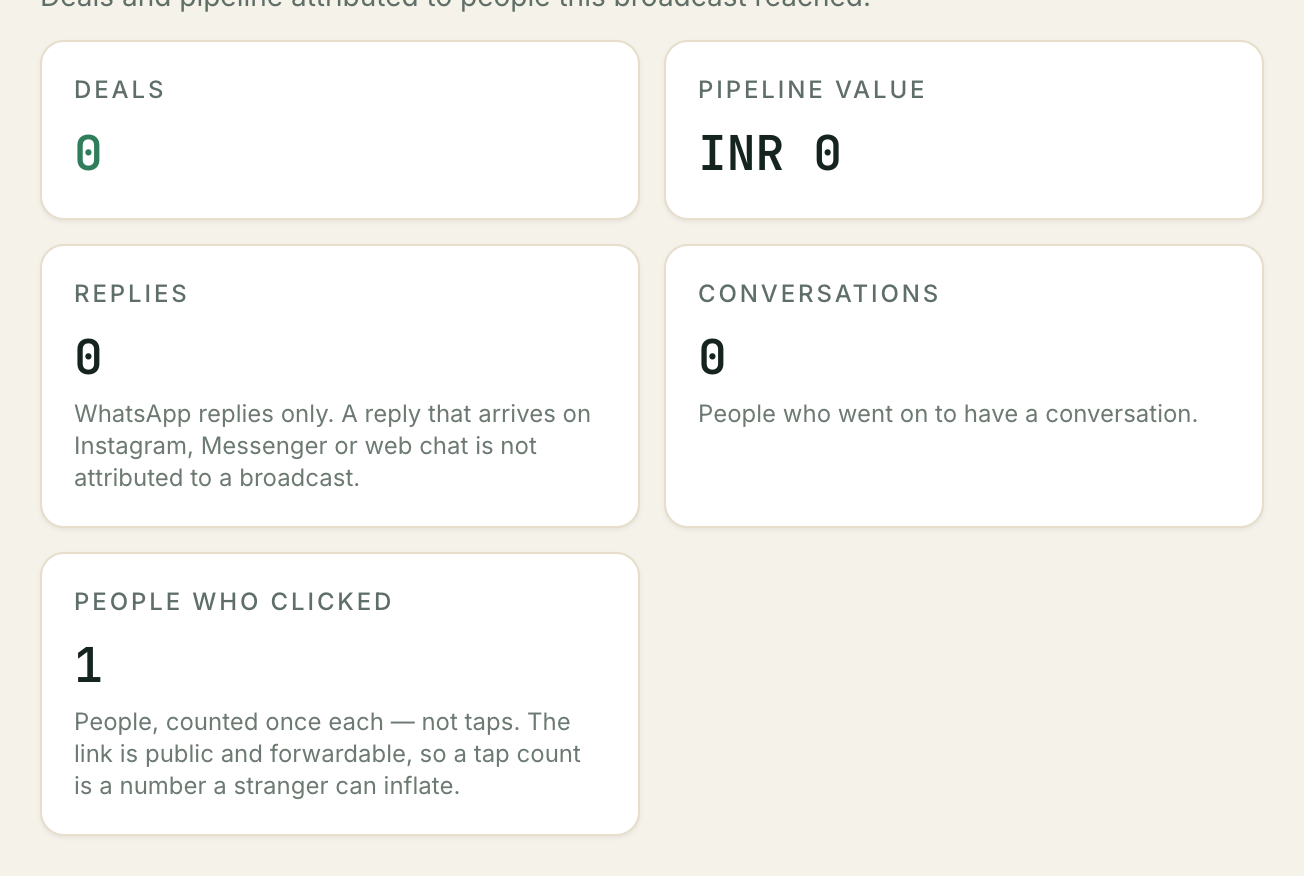
| Deals | Deals on your board that came out of a reply to this campaign |
| Pipeline value | What those deals are worth |
| Replies | People who wrote back |
| Conversations | Threads this campaign started |
| Clicks | People who opened the tracked link, counted once each — see below |
This is the number to judge a campaign on. Two thousand delivered and four deals is a worse campaign than three hundred delivered and eleven deals, and only this block tells you which one you ran.
How a reply gets credited
A reply is credited to a campaign if it arrives within 72 hours of the message going out. The deal that comes out of that conversation carries the same credit. The report states the window it used underneath the opt-out figure, so read it there rather than assuming 72.
Three rules:
- The most recent campaign wins, and only one is credited. Someone who received two campaigns this week and then writes back is credited to the later one. A reply is one event — letting it count for two campaigns would inflate the only figure we are asking you to trust.
- Credit is given once and never revised. A later campaign cannot take a reply that has already been counted.
- Nothing before the send counts. People who were skipped were never messaged, so they can never be credited.
⚠️ Only WhatsApp replies are credited. A campaign goes out by phone number. If a customer answers you instead on Instagram, Messenger or your website chat instead, that conversation is handled completely normally and the deal is real — but it is not counted against the campaign. Your true response is somewhat higher than this block says, and there is no way to tell by how much.
Pipeline value in more than one currency
If the deals are all in one currency you get one total. If they are in several, the report shows the totals separately and does not add them up. A single number made by adding rupees to dirhams is a number nobody can act on.
Clicks
People, not taps. Clicks counts how many of the people you sent to opened the tracked link — each person counted once, however many times they tapped. That is deliberate: the link travels, and anyone the message was forwarded to can open it as often as they like, so a taps figure is a number a stranger could inflate. Counting people keeps it a number you can act on.
Clicks are only recorded if the campaign was set up with a tracked link button, which today is done through the API and has no screen. A campaign sent without one reports zero — read that as not measured, not as nobody clicked.
Who we sent to, and who we held back
| Number | What it counts |
|---|---|
| Selected | Everyone the audience picked up |
| Sent | Messages that actually went to Meta |
| Suppressed | People deliberately not messaged, with reasons |
| Failed before send | Never became a message |
| Failed after send | Went, and Meta rejected it afterwards |
| Pending | Not dealt with yet |
Selected is not a promise. The audience is built honestly — everyone who matches — and then each person is decided again at the moment of sending. The gap between selected and sent is the whole safety mechanism of the feature, and it is shown to you rather than hidden by quietly building a smaller list.
Why people were left out
Five reasons, and every suppressed person has exactly one:
| Reason | What happened | Is it a problem? |
|---|---|---|
| No consent record | You have no record of them agreeing to hear from you | Not a fault. Fix it at the source — see Importing contacts |
| Opted out | They asked you to stop | Working as intended, and not overridable |
| Do not call | On your own Do not call list | Working as intended |
| Frequency cap | Already had a marketing message from you today, or four this week — or the same number appears twice in this campaign | Working as intended — send the rest tomorrow |
| Invalid number | Could not be read as a phone number | Worth fixing: check the number on the contact |
A first campaign where most of the list is no consent record is normal and it is the safe outcome. It means the message went to the people who did opt in, and did not go to the people who did not.
⚠️ A campaign built from a pasted list of phone numbers reports 100% no consent record and sends nothing. A consent record lives on a contact, and a bare number is not a contact — so every row in that audience is suppressed, even where the number belongs to a contact you already have. A campaign that sends anything is one whose audience came from a segment. Bring the numbers in as contacts first — see Importing your contacts.
Two numbers that look wrong and are not
Sent counts messages that left, not messages that arrived. A message Meta accepted and then rejected a moment later is counted in sent and in failed after send. That is why the two failure figures are shown separately: adding them all together would total more than your audience.
Sent is also the number you are billed on. It is worked out with exactly the same rule the fee uses, so the report and the invoice cannot disagree.
Opt-outs this campaign caused
Every campaign costs you some permission. This block is what it cost, and it sits here — with the people it reached, above the delivery figures — because it is a fact about the campaign, not an afterthought.
It reads at least 12, never 12, and the wording is the important part.
⚠️ This number is a floor, not a total. It counts people who asked you to stop inside a conversation this campaign is credited with — one that started from a reply within the attribution window. Three kinds of opt-out are real and are not counted: someone who goes quiet and asks you to stop in a fresh conversation weeks later, someone who says it on a phone call, and someone one of your team recorded by hand. There is no way to tell how many of those there were.
Under the number is a sentence naming the window it was worked out from, and a link to the people themselves — See who opted out — which opens your opt-out list already narrowed to this campaign.
Why it is deliberately incomplete rather than estimated. The question this number feeds is “is this campaign damaging our WhatsApp number?”, and that is a question people act on. A partial count presented as a total would make a real problem look smaller than it is. A floor cannot do that: if it says twelve, there were at least twelve.
Someone who opted out and later asked you to resume is not counted here. The block counts opt-outs still in force, so a person who came back stops appearing.
⚠️ You cannot undo an opt-out from this screen, or from any screen. Only the customer can lift it, by asking you to start again — there is deliberately no control anywhere that resumes messaging on someone’s behalf. See When a customer asks you to stop.
Reading it against the rest of the report
A campaign with strong deals and a high opt-out count is not a success with a footnote; it is a campaign that bought this month’s pipeline with next quarter’s audience. Compare the two blocks over several sends rather than one, and treat a rising floor as the early warning it is — long before Meta’s quality rating tells you the same thing more expensively.
Zero is a real answer and a common one. It means nobody replied STOP inside the window, not that nobody was unhappy.
Delivery and reads
Last, and deliberately so.
| Number | What it counts |
|---|---|
| Delivered | Reached the handset |
| Read | Two blue ticks |
| Awaiting status | Sent, and Meta has said nothing about it yet |
| Of sent | The messages this block is measured against |
⚠️ These counts are never final. Delivery and read receipts arrive from Meta after the send — minutes later, sometimes hours, and sometimes not at all. The report says so on the block itself, and shows awaiting status so you can see how much is still outstanding.
A campaign finished an hour ago will have delivery figures that are wrong by morning, upwards. Do not compare two campaigns on delivered until both have gone quiet, and never read delivered as not delivered for the ones still waiting.
On an old campaign, this block says nothing at all
Delivery and read receipts are kept for 90 days and then deleted. Once part of a campaign is older than that, the block stops showing delivered, read and any percentage, and says so instead: We no longer have the delivery receipts for this campaign.
That is the honest answer rather than a convenient one. A count built from the receipts that happened to survive the sweep would read as a delivery collapse on a campaign that delivered perfectly well.
The number sent is unaffected, and the block restates it. Sent comes from the campaign’s own records, which are never deleted — so the figure you were billed on is still there to check, whatever age the campaign is.
Read is even less complete than delivered. A customer with read receipts turned off never reports a read, whatever they did with the message. Low read counts are usually a fact about the audience’s phone settings, not about your message.
This is also the honest reason the block is at the bottom. It is the number every other tool leads with, and it is the number we can stand behind least.
What the report does not tell you
- Whether a person actually saw it. Delivered is a handset, not a human.
- Who clicked. Only how MANY people did, and only when the campaign had a tracked link. Which person tapped is not shown, and nothing about the tap (no IP, no device, no referrer) is stored.
- Whether it was a good message. Compare campaigns on deals, over several sends, not on one — Comparing your campaigns puts them side by side.
- Anything about people who replied elsewhere. See the warning above.
- How many people it made unhappy. The opt-out block is a floor, and the three kinds it cannot see are listed with it. Nothing here counts the people who simply stopped answering.
Troubleshooting
The numbers do not add up
They should: selected = sent + suppressed + failed before send + still pending. If they do not, that is worth telling us about rather than working around — the report checks its own arithmetic and can tell us where it went.
Remember that failed after send is inside sent and is not part of that sum.
Deals is zero and people definitely replied
Three possibilities, in order of likelihood:
- The replies were not leads. “No thanks” is a reply. It is not a deal.
- Your intake rules did not match. Deals are created by the rules on your pipeline, not by the campaign.
- They replied on another channel. Instagram and website chat replies are not credited to the campaign.
Delivered has been stuck for hours
Some of Meta’s receipts never arrive. Awaiting status tells you how many are outstanding; if it stops moving, that is where it stops. It does not mean those messages failed — a failure is reported as a failure.
An old campaign shows no delivery figures at all
Its receipts aged out — Kooday keeps them for 90 days. The block says so rather than showing a rate. It does not mean the messages were not delivered, and it does not affect sent, the deals, or anything else on the page.
Sent is lower than the audience
That is the second block, and it is the useful half of the report. Read the suppression reasons.
Still stuck? We answer support mail the same working day.
Email support