Choosing how your assistant sounds
Personas set your assistant's manner — how it opens, how hard it pushes, how it closes. Use one of ours, or copy it and make it yours.
Two different things shape what your assistant says.
What it knows comes from your instructions and your knowledge base — your prices, your opening hours, the fact that you do not deliver on Sundays.
How it carries itself comes from its persona — whether it opens warmly or briskly, how hard it pushes for a next step, how it closes a conversation, what it does when it cannot help.
This page is about the second one. If you want to change a fact your assistant gets wrong, you want Instructions, not this.
Where to find it: open Bots in your dashboard, pick an assistant, click Open studio, then the Persona pane. See Prompt Studio for a tour of the other two panes.
The standard personas
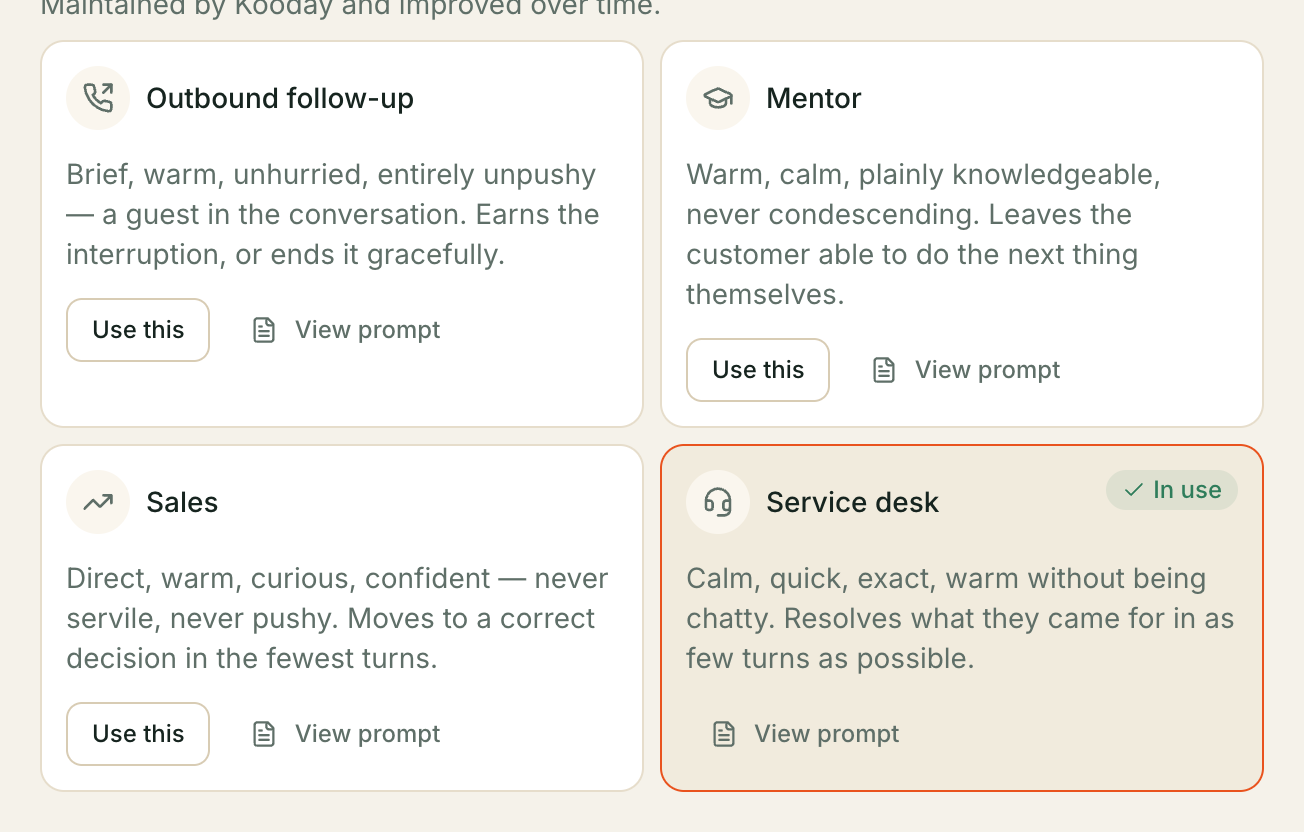
Most assistants start on one of ours — unless you chose Start blank when creating it, in which case it has no persona at all until you pick one here:
- Sales — a senior sales consultant. Direct, warm, curious. Asks, then stops and waits rather than filling the silence. It carries a full method — eight stages, a play for each situation, and five things it will never do: How your assistant sells sets all of it out.
- Customer service — resolves the thing at hand, honestly, without overselling.
- Mentor — explains and guides rather than closes.
- Follow-up — picks up a conversation that has gone quiet.
Each one comes in three parts: a core manner, plus a version tuned for phone calls and a version tuned for text chats. Your assistant uses the right one automatically — a phone call and a WhatsApp thread are genuinely different jobs, and the same wording does not work for both.
We keep improving these. When we make a standard persona better, every assistant using it gets that improvement, without you doing anything.
Making it yours
If a standard persona is nearly right but not quite, copy it. You can copy a standard persona, or one of your own copies made for another assistant — a copy is not locked to starting from one of ours.
- Open the Persona pane and choose Make your own copy.
- Pick which persona to start from, and give your copy a name.
- Edit the three parts and publish each one.
- Come back to the Persona pane and choose Use this.
Your copy starts as an exact duplicate of whatever you copied, so a copy you have not edited yet behaves the same way.
A copy made while creating an assistant works differently. The create-assistant dialog’s Copy this persona instead button (or its Or copy one of your own personas… link) skips steps 3-4 above — that copy is ready to use immediately, because it is copying text that was already published somewhere. A copy made from this Persona pane always starts as a draft, the walkthrough above.
A copy stops getting our updates. This is the one thing worth understanding before you copy. Your copy is yours — so when we improve the standard persona it came from, that improvement does not reach your copy. Nothing breaks; your assistant simply stays as you wrote it.
That is often exactly what you want. But if you copied a persona a year ago and changed two sentences, you have also been missing a year of improvements to the rest of it.
You can switch back to a standard persona at any time, from the same pane. Your copy is not deleted — it stays in Your personas, and you can switch to it again later.
What a copy can and cannot change
A copy changes your assistant’s manner. It does not change the rules every Kooday assistant follows — the safety rules, the channel handling, the language handling. Those stay attached whichever persona you use, and there is no way to detach them.
That is deliberate. It means a copy can never accidentally leave your assistant without the conduct it needs to answer a real customer safely.
Things to know
A draft persona cannot be used. Each copy has three parts, and all three must be published before you can switch an assistant onto it. Until then it shows as Draft and offers no Use this button. If yours is stuck on Draft, one of the three parts is still unpublished.
One persona, many assistants. A copy belongs to your account, not to one assistant. Make it once and use it on as many assistants as you like.
Naming. Your copy’s name is made from what you type — lowercase letters and
numbers only, spaces and punctuation dropped. “Our Sales Voice” becomes
oursalesvoice.
No persona at all is also an option. Choosing Start blank when creating an assistant means it has no persona bound — its manner comes entirely from your instructions, with nothing to fall back on. The Persona pane will flag this until you pick or copy one.
Changing persona takes effect on new conversations. A call or chat already in progress finishes with the persona it started on.
Language is not part of the persona
Your assistant follows whichever language a customer uses — Malayalam, Manglish, English, or another Indian language — and it does that regardless of which persona it is on. There is no “Malayalam persona” to choose, and that is a decision rather than a gap.
The persona is how you sell; the language is who you are talking to. A warm, patient manner is warm and patient in Malayalam too. Splitting the persona per language would mean maintaining the same selling method twice and having them drift apart — and it would make it impossible to tell whether a change in results came from a change to the method or from a change in who happened to be writing in.
What is per-language is the register: how a price is said in Malayalam, how an ask is softened, which everyday words stay in English mid-sentence. That is handled for you and it is the same for every persona.
Two consequences worth knowing:
- Editing a persona changes it in every language at once. There is no version of your persona that only applies to English conversations.
- Reaching OUT in Malayalam is a separate thing and needs its own approved templates — see Why your follow-ups need their own template. Replying in Malayalam needs nothing.
Which one should I change?
| I want to… | Go to |
|---|---|
| Fix a wrong price, hours, or policy | Instructions, or Knowledge base |
| Make it less pushy / more formal / warmer | Persona — copy and edit |
| Change what it does when it cannot help | Persona — copy and edit |
| Add products it can talk about | What you sell |
| Change which channels it answers on | Configuration |
Still stuck? We answer support mail the same working day.
Email support