Reviving stalled enquiries
Your assistant can go back to a customer who went quiet and send them something genuinely useful — a spec sheet, a comparison, a photo — instead of another "just following up". What it does, who it targets, and the limits that keep it that way.
Someone asked you about ceramic coating three weeks ago. You had a real conversation. Then they went quiet — and they never said no.
Usually that silence is a question they did not ask out loud. Is graphene worth the extra? Does film actually stop UV, or is that a sales line? They are not avoiding you; they are stuck, and a message asking whether they are still there does nothing about it.
Your assistant can send them the answer instead. It picks one file from your own library — a comparison, a spec sheet, a before-and-after, a short walkthrough — and sends it with one line saying what it is. That is a different message from “just following up”, and it is the only kind that gives someone a reason to come back.
⚠️ This is not a way to message your list. It only ever reaches people who already enquired with you and have an open deal on your board. There is a lifetime limit of three messages per customer, and at least seven days between them. If you want to reach everyone, send a campaign — that is what campaigns are for.
Where to find it: Bots → your bot → Templates, then the switch labelled Let the assistant revive stalled enquiries.
What has to be true before it sends
Five things, and every one of them is checked again at the moment of sending, not just when the deal is picked.
| An open deal | On your board, in a column that is not Won and not Lost. Someone who asked “is my order ready?” never produces a deal, so they can never be nurtured — that is the whole filter, and it cannot misfire. |
| Warm | Your assistant reads every conversation and marks the deal hot, warm or cold. Only warm is nurtured. See below — this surprises people. |
| Quiet for at least a week | A deal that went quiet yesterday is a live conversation. |
| They messaged you on WhatsApp | Files can only be attached on WhatsApp today. A deal that came from your website chat, Instagram, Messenger or a phone call is skipped. |
| A file that fits | If nothing in your library answers what they were asking about, nothing is sent. It does not pick something just to have picked something. |
Why your best deals get nothing
Hot deals are never nurtured. This looks like a bug and it is not.
A hot deal is one where the conversation is live — they replied recently, they are asking questions, something is happening. That deal is already getting your assistant’s normal follow-up, which is the right instrument for it. A marketing message on top of a live conversation is noise, and it is noise you pay Meta for.
Cold deals get nothing either, and that is the more important one. A cold lead has, by your assistant’s own reading, signalled they are not interested. Content does not fix disinterest — but messages to people who did not want them get you blocked and reported, and Meta counts that against your number’s quality rating. A cut quality rating throttles everything, including the order updates your paying customers are waiting for. One promotional message to the wrong person can cost you the transactional messaging you actually depend on.
So the target is the middle: a real conversation happened, a specific need was named, and it went quiet without a no.
The limits, in full
These are not settings. They are how the feature is built.
| Limit | Value |
|---|---|
| Messages per customer, ever | 3 |
| Minimum gap between them | 7 days |
| After two with no reply | Stops. The reply is the only signal that counts. |
| The same file twice | Never. |
| Time of day | Inside your contact window, and never outside 9am–9pm local whatever your window says. |
| Alongside campaigns | Shared. A customer who received a broadcast this week counts against this too — one business, one limit. |
| They replied STOP | Never contacted again for anything promotional. |
That last row is worth reading twice. Nurture messages carry the Reply STOP to stop promotional messages line, they are Marketing in Meta’s eyes, and a customer who stops them keeps getting their order and booking updates. See When a customer asks you to stop.
Turning it on
1. Put some files in your library
The assistant can only send what you have given it. A library of one PDF is a feature that mostly does nothing.
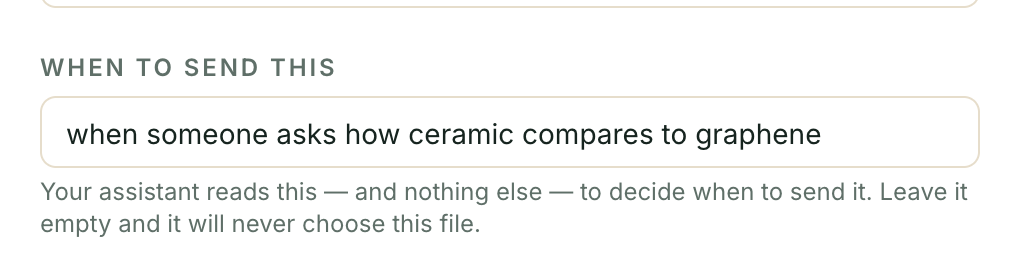
For each file, the field that matters most is when to send this — one line, in your own words, describing the moment it helps: “when someone asks how ceramic compares to graphene”, “when a customer wants the full terms before paying”.
That line is the only thing the assistant reads when choosing. It does not read
your filenames — a real library is brochure_v3_FINAL.pdf and
WhatsApp Image 2026-08-14.jpg, and those are not intent. A file with that line
left blank is invisible to the assistant. It is not ranked lower; it is not
considered at all.
2. Get the four templates approved
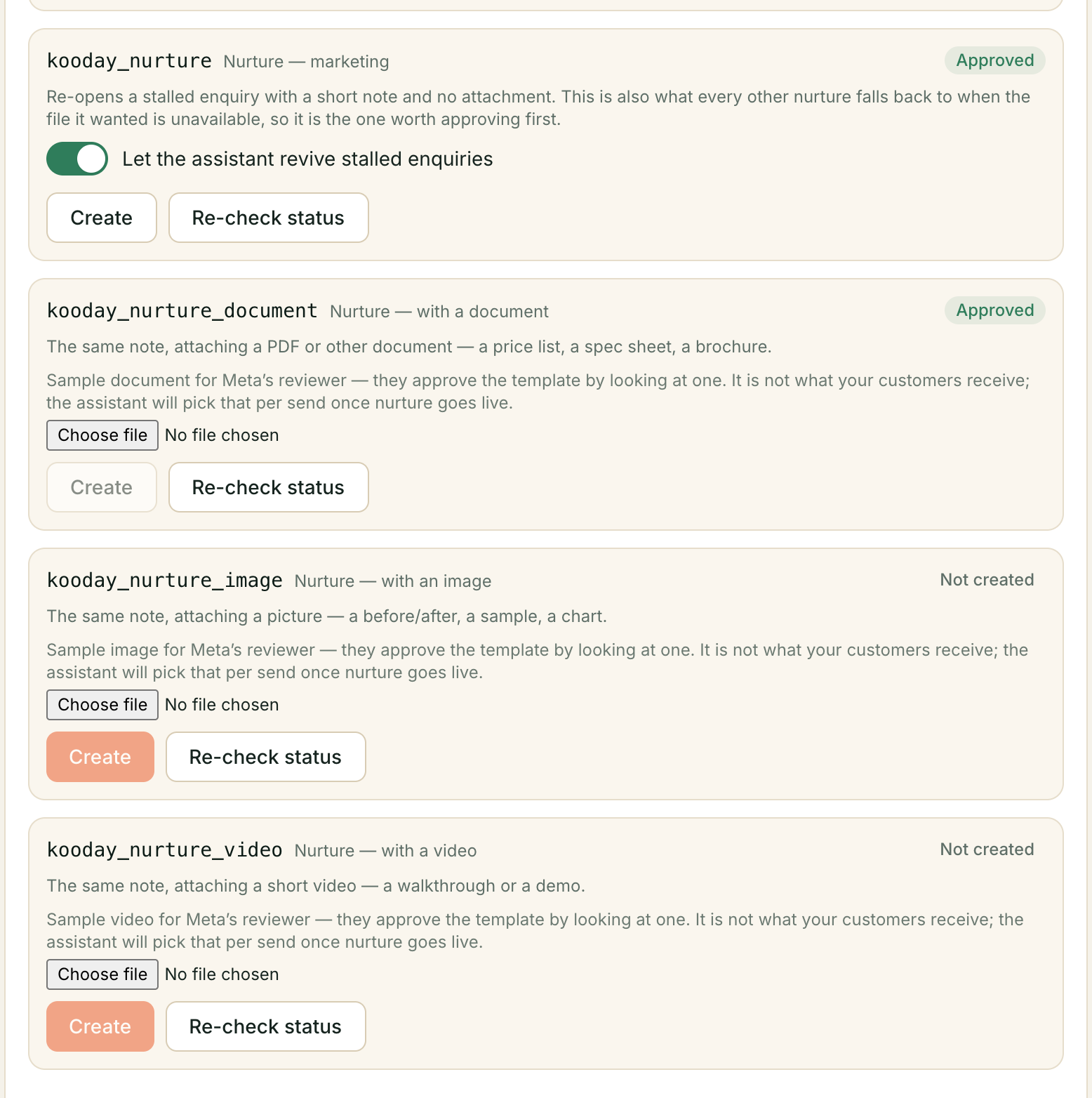
Outside the 24-hour window after a customer’s last message, WhatsApp allows only templates Meta has approved in advance. Nurture uses four, and the split is Meta’s rule rather than a choice:
| Template | Carries |
|---|---|
kooday_nurture | A note on its own, with no attachment |
kooday_nurture_document | A PDF or other document |
kooday_nurture_image | A picture |
kooday_nurture_video | A short video |
An approved template is locked to exactly one kind of attachment, and a declared attachment cannot be left off. That is why one template cannot cover all four cases.
Approve kooday_nurture first. It is the one everything else falls back to —
when the file it wanted has been archived, when its own template is not approved
yet, when nothing in your library fits. Without it, nothing sends at all.
The three attachment templates each need a sample file at creation: Meta approves the template by looking at one specimen. It is not what your customers receive — the assistant picks that per send.
The Templates tab tells you exactly what is sendable today, in words: “Ready to attach documents”, or “nothing can be sent yet”, or “The plain nurture note is approved and ready”.

3. Turn on the switch
One switch for all four — Let the assistant revive stalled enquiries. Approval is Meta’s decision; this one is yours, and a send needs both. It starts off.
What it costs
A nurture send costs ₹0.20 as a platform fee, plus Meta’s own marketing message fee, which you pay Meta directly. If the customer taps back, that opens a 24-hour conversation billed at the normal ₹1.49.
Notice what that means: a nurture that works costs more than one that does not. That is fine — a revived deal is worth many times it — but it is why “send more” is never the improvement here.
It is included in the Sales pipeline add-on. There is nothing extra to buy.
Reading the results
Above your pipeline board, How it’s selling carries a Reviving stalled enquiries section: how many went out, how many carried a file, and how many customers came back within a week.
Beside that is a second number — without any nurture. A small share of eligible deals is deliberately left alone, and their revival rate is shown next to the real one. Without it there is no way to tell a revived deal from one that was coming back anyway, and a number you cannot trust is worse than no number.
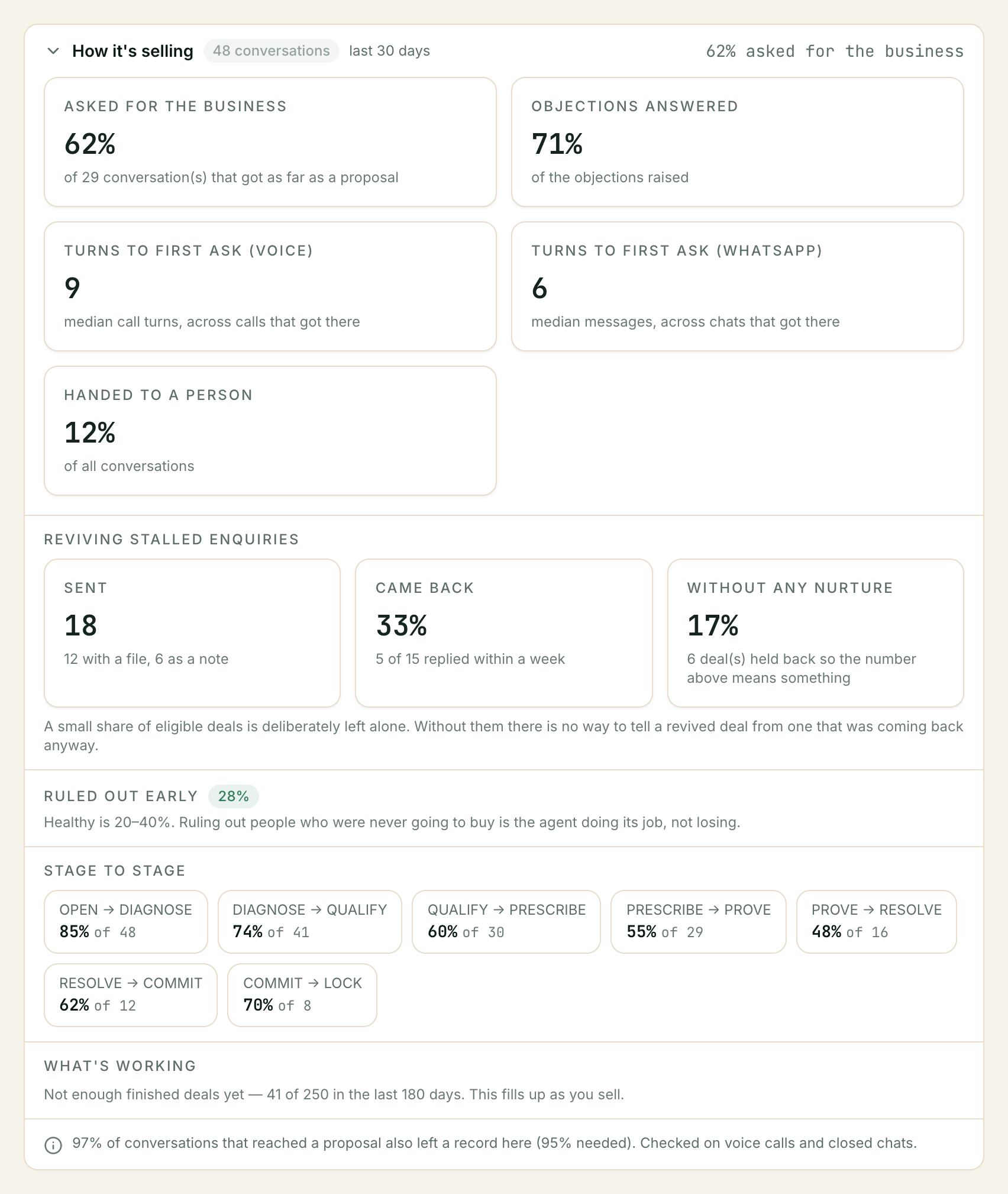
If very few messages have gone out, the panel says so rather than showing a percentage. A rate calculated on four sends is noise.
Troubleshooting
Nothing has been sent at all
Work down this list, most likely first:
- The switch is off. Bots → your bot → Templates.
kooday_nurtureis not approved. The Templates tab says so plainly. Every other nurture falls back to it, so without it nothing sends.- Your library is empty, or every file has a blank when to send this. A blank line makes a file invisible to the assistant.
- No deal is warm. Check the board — hot and cold deals are both skipped by design.
- Nobody has been quiet for a week yet.
A deal I expected to be nurtured was not
Nine reasons, all deliberate, are listed on Why a deal was not nurtured.
The customer got a plain note with no file attached
That is the fallback working. It happens when the file the assistant chose has since been archived or replaced, when the template for that file type is not approved yet, or when nothing in your library fitted. The customer still gets a message; only the attachment is lost.
The same customer keeps appearing on the board and nothing happens
Check whether they replied STOP, or whether they have already had three nurture messages. Both are permanent.
A sensible first setup
Library:        4–6 files, each with a real "when to send this" line
                (a price list, a comparison, one before/after, one FAQ PDF)
Templates:      kooday_nurture approved first, then kooday_nurture_document
Switch:         on
Contact window: 10:00–19:00 (or leave it unset — 9am–9pm still applies)
Start with the plain template and documents. Images and video are worth adding once you can see which files people actually come back to.
Still stuck? We answer support mail the same working day.
Email support