Your customer profiles
One page per customer that holds the identities they reached you on, their calls and messages, what your assistant remembers about them, and the standing instructions you want it to follow next time.
The same person phones you on Tuesday and messages your WhatsApp number on Thursday from the same number. Two conversations, two places, and nobody joining them up.
Customer 360 keeps those two together: a call and a WhatsApp message from one number land on one page. A visitor on your website chat, Instagram or Messenger keeps their own page, not connected to it automatically. Each person gets one page that holds every identity they have reached you on, every call and message on all of them in one list, a running summary of what your assistant has learned about them, and the standing instructions you want followed on their next conversation.
Nothing here is typed in by you. The profiles build themselves as people contact you.
Where to find it: Customer 360 in the left-hand menu. Only team members with admin access can open it.
Customer 360 is a paid capability. If it is not on your plan the page says “Customer 360 is not part of your plan” with a link to Billing, and the menu item is hidden entirely on accounts where it is not available.
Contacts and customer profiles are two different things
This trips people up, so it is worth thirty seconds.
| Contacts | Customer profiles (this page) | |
|---|---|---|
| Where it comes from | You. Imported, or pushed from your own system | Built by Kooday from who actually turns up |
| What it holds | Name, phone, email, your own custom fields | Every handle they have used, their conversations, the memory summary |
| Who edits it | You | Nobody — it is observed, not entered |
| If they never contact you | Still there | Does not exist |
Kooday never writes back to your contacts. Your imported list is the
source of record and stays exactly as you gave it. When a customer profile can
be matched to one of your contacts, the profile carries a link to it — a
Linked to CRM contact chip on the page, and a Linked contact panel with
their name, phone and email and a View in Contacts → link. The matching is
done on the last ten digits of the phone number, so +91 98470 12345 and
09847012345 are the same person.
A profile with no matching contact is perfectly normal — a website chat visitor who never gave a number has a profile and no contact.
⚠️ A profile is not a merge tool. If a phone number already belongs to a different profile, Kooday leaves both alone rather than guessing they are the same human. There is no “merge these two customers” button today. This is also why a customer who taps Continue on WhatsApp on your website chat (see Continue on WhatsApp) shows as two profiles here — the website visitor and the WhatsApp sender — even though your assistant carries the website conversation into its first WhatsApp reply. Nothing about that button links the two profiles.
See Importing your contacts for the other half.
The directory
The list is sorted by Last seen, newest first, 25 to a page. Five columns:
| Column | What it shows |
|---|---|
| Customer | Their name, or Unknown person if nobody has given one. A second line reading Linked to … appears when the linked contact goes by a different name |
| Channels | One chip per channel they have ever reached you on |
| Messages | Two counts — messages, and calls |
| Last seen | The most recent activity of any kind |
| What we know | The first 160 characters of the memory summary, or Building memory… if there is not one yet |
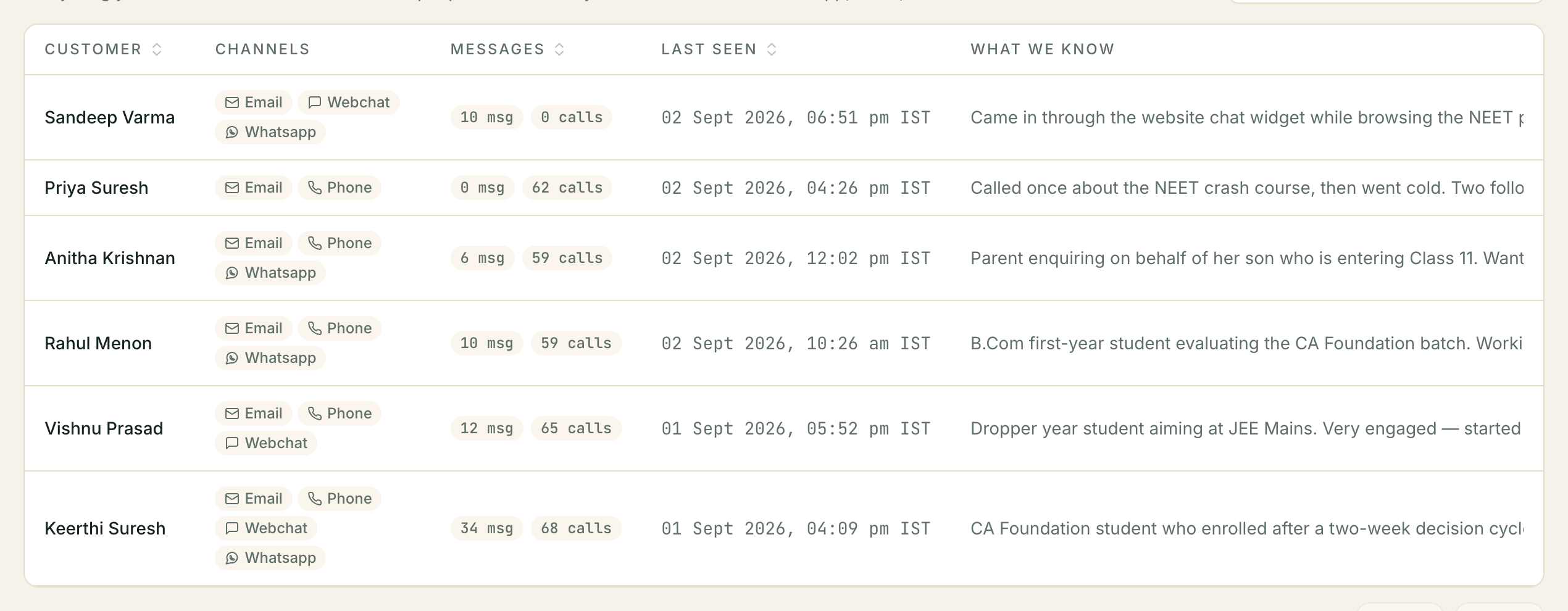
Click any row to open the profile.
Two empty states, and they mean different things. “No customer profiles yet” means nobody has contacted you on a channel Kooday is watching. “No customers match ”…"" means your search found nothing — there is a Clear search button next to it.
What the search box actually searches
The box says Search name or memory… and that is exactly the list: it looks in the customer’s name, the linked contact’s name, and the text of the memory summary. Nothing else — not phone numbers, not handles, not the transcript of a call.
The memory half is the useful half, and it is not obvious. Because the summary
is prose your assistant wrote about the person, searching roof finds everyone
whose summary mentions a roof, whether or not you ever tagged them. It is a
plain contains-match: roof finds “roofing”, and searching two words looks for
those two words next to each other, so type one word rather than a phrase.
Press Enter to run it. It searches your whole account, not the page you are looking at, and the count above the pager updates to match.
The other search — the one your assistant does
Your assistant has a separate lookup it uses mid-conversation, over your contacts, when a caller asks it to find someone. That one is ranked, and it behaves in a way worth knowing about because it is why results come back in a sensible order.
Every word you search is weighed by how rare it is in your own contact list. In a list of about a thousand contacts, if eleven of them mention paint and sixty-nine mention business, then a search for paint business puts the paint people at the top: the rare word carries several times the weight of the common one. Nobody maintains a list of words to ignore — a word that is on half your contacts stops counting because it is on half your contacts.
Three consequences:
- It matches whole words, stemmed —
paintfinds paints and painting, butcardoes not find Dental Care. - Words are pooled, not required. A contact matching only one of your three words still comes back, just lower down.
- A near miss still lands. If nothing matches at all, it retries allowing
small misspellings, so
dentstfinds the dentist. That only happens when the exact search found nobody.
It returns at most ten people, and it will tell your assistant when there were more rather than pretending the ten were all of them.
What one profile shows
The page is one column, read top to bottom.
Who they are
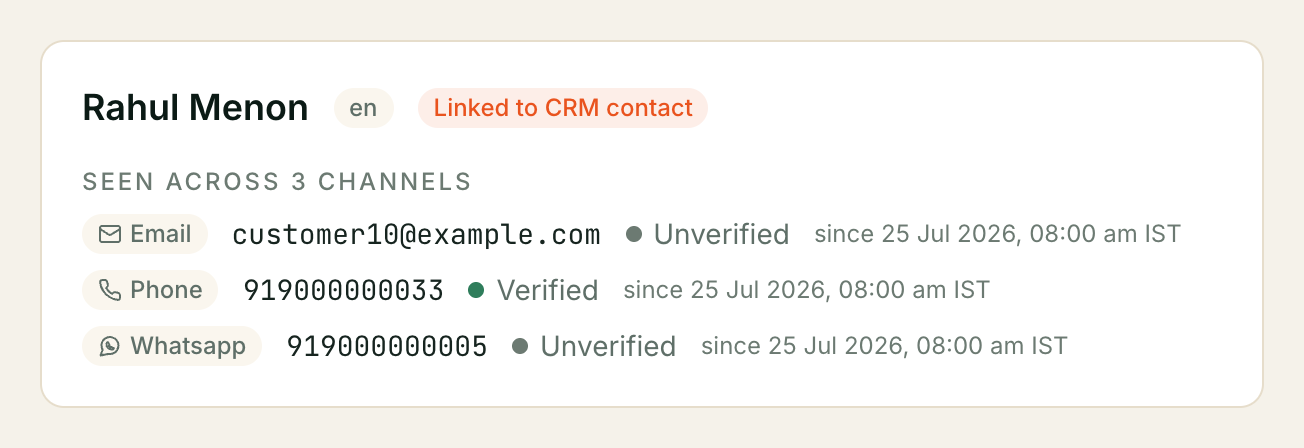
The name, the language they were last speaking if Kooday knows it, and Seen across N channels — then one row per identity: the channel, the handle itself, whether it is Verified or Unverified, and the date it first appeared.
A call and a WhatsApp message from the same number share one phone row, because both arrive with a number the phone network or WhatsApp delivered. So that customer shows once, with one phone identity, not twice. Website chat, Instagram and Messenger each show their own row on their own page.
If they have told your assistant the name of their business, it shows next to their own name at the top — nothing appears there if they have not.
Customer memory
A short piece of prose your assistant has written about this person, folded from everything they have said to you so far. It is what gets handed to your assistant at the start of their next conversation on any channel — so a customer who explained their situation on the phone in June does not have to explain it again over WhatsApp in August.
Before there is one, it says “Memory builds automatically as this person has more conversations. Nothing has been summarised yet.”
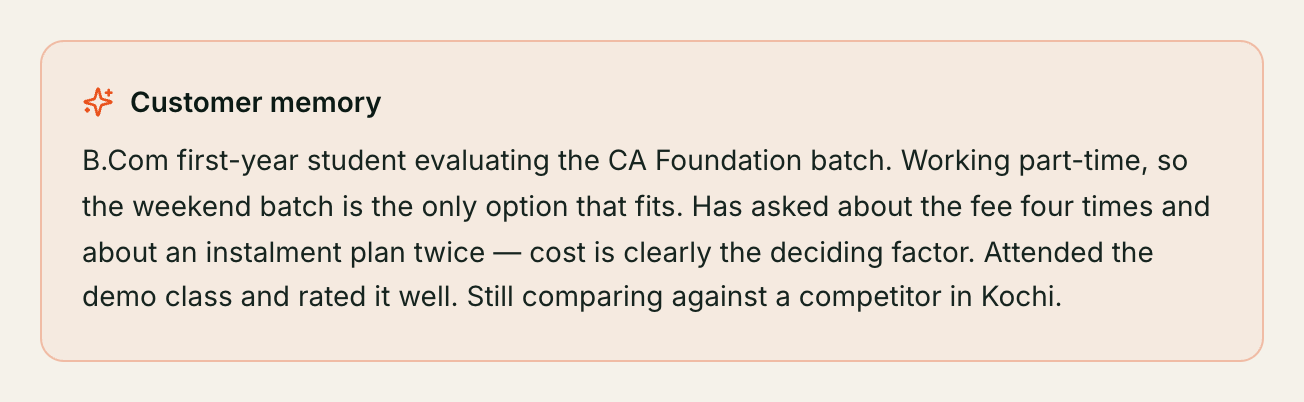
Two things to know:
- It is not written live. The summary is rebuilt shortly after a conversation, not during one, so a call that just ended may not be reflected for a minute or two.
- It is read-only. There is no way to edit or delete a summary from this page. If you want to change what your assistant does with a customer, use Brief your assistant below — that is the control, and the memory is deliberately kept as the raw record of what was observed rather than a mix of the two.
Memory is switched on and off account-wide by the Customer memory switch in your settings. With it off, no summaries are written at all and every profile here shows Building memory….
For what your assistant carries between conversations and what it deliberately forgets, see How your assistant remembers — that page covers the memory itself; this one only covers where you look at it.
Brief your assistant
The most useful control on the page. It puts a standing instruction on this customer, which your assistant will know on their next call, chat or message.
Write it the way you would tell a colleague — the box suggests “e.g. Approved 10% off the annual plan, valid till the 31st”. Then the one decision that matters:
| Visible to AI | What happens |
|---|---|
| Ticked | ”Your assistant will follow this in conversations with this customer.” It goes into your assistant’s context every time it speaks to them |
| Unticked (the default) | “Private note — this is NOT shared with your assistant.” It is stored for your team to read on this page and never reaches your assistant, on any channel |
The box is unticked by default, deliberately: writing something down for your colleagues should not be a way to accidentally instruct your assistant. You have to reach for it.
That single tick is the whole enforcement. A private note is not “less prominent” or “lower priority” — it is not sent. Each saved line carries a chip reading Visible to AI or Private note so you can see at a glance which is which.
Expires is optional. Set a date and the instruction stops being used at the end of that day — the discount valid till the 31st is honoured on the 31st and gone on the 1st. Leave it empty and it stands until you turn it off.
Saved lines appear under In effect now, each with a Turn off button. Turning one off does not delete it; it moves to a collapsed Turned off (N) list, so “what was my assistant told at the time?” stays answerable later. There is no edit and no delete — to change an instruction, turn the old one off and write a new one.
⚠️ Only your ten most recent live instructions are used. Nothing stops you saving an eleventh, and no warning appears — but when your assistant is briefed, it is given the ten newest instructions that are still on and not expired, and the older ones are silently left out. If a customer’s list is getting long, turn off the ones that no longer apply rather than piling more on top.
Each instruction can be up to 2,000 characters. A longer one is refused when you save it.
An instruction is context, not authority: it tells your assistant what to take into account, it cannot give it abilities it does not have. “Approve a refund up to ₹500” only works if your assistant could already do refunds.
Recent activity across channels
Calls and messages from every identity, shown together in one list, newest first — the last twenty of each. Where a message merely echoes a call already in the list, only the call is shown.
Calls show the direction, the outcome your assistant recorded, a sentiment dot, the length, and a View call → link through to the full transcript and recording. Messages show the direction and the text, or “No message text captured.” when there is nothing to show.
If nobody has contacted this person yet it says “No interactions recorded yet.”
Attributes
Appears only when the profile carries structured fields, and shows them exactly as they are stored. Most profiles have none, and an empty Attributes block is not a fault.
⚠️ Kooday does not infer facts about your customers. There is no automatically derived profile — no inferred budget, no “likely to buy”, no confidence score, nothing tagged by a model. Everything on this page is either something that observably happened (a call, a message, a handle) or something a person wrote. The memory summary is the only thing your assistant authors, and it is prose, not fields.
What we’ve learnt about this buyer
Under the memory and the briefing box sits the part your assistant worked out for itself: how this person tends to buy.
It comes from behaviour across enquiries, never from one chat. Somebody who asked about price once has told you nothing; somebody who has asked about price in three separate enquiries over six months has told you a great deal. So nothing appears here until the same person has been in touch more than once, and each line says how many enquiries it was seen across so you can judge it yourself.
A low count means “not enough history yet”, not “nothing to say.” An empty block is the ordinary state for most of your customers, and it is not a fault.
Three kinds of line can appear:
- How they buy — a short phrase like Takes time to decide or Shops around on price, with how many enquiries it came from.
- Why a previous enquiry stopped — for example Was checking a competitor, usually with what they said at the time in their own words. ⚠️ This is background only. Your assistant still asks and still qualifies from scratch: people change jobs, change their minds, and a competitor this year is a customer next year. It never refuses to talk to somebody because of a line here, and it never stops them being contacted.
- Possible revenue increase — something they said suggests they might also need, with the price from your own catalogue and their own words underneath. Your assistant mentions these only after the main sale is agreed, never instead of it.
Removing one takes a click. Press Remove on any line and your assistant stops using it from that person’s next conversation. The line stays on the page, struck through, so you can still see what it used to think — and once you have removed something, it will not come back on its own.
What this page does not do
Worth stating plainly, because people reasonably expect them:
- No orders, quotes or deals block. The profile shows conversations, not commerce. Deals live on the pipeline board.
- No write-back to your CRM. Nothing Kooday learns is pushed to your own system, and deals are not synced anywhere.
- No editing. Aside from briefing your assistant, the page is read-only — names, handles and memory come from what actually happened.
- No merging two profiles into one.
- No score, no ranking, no lead grade. The buyer block is a handful of observations with their reasons, not a number out of ten. Kooday does not rank your customers and there is no list of your “best” ones.
Troubleshooting
Everyone shows “Building memory…”
Check the Customer memory switch in your settings. With it off, no summaries are ever written and the column stays like that indefinitely. With it on, a summary appears shortly after the person’s next conversation — it is not backfilled retrospectively for people who have gone quiet.
Searching a phone number finds nothing
The directory search does not look at phone numbers or handles — only names and the memory text. Search the person’s name, or find them in Contacts and open the profile from there.
A number is labelled “callback, unverified”
A website visitor can type a phone number that you already hold for someone else — often a returning customer typing their own number. Kooday never lets a typed number take over that customer’s record, so it is kept on the visitor’s own profile as a callback contact:
- It is listed after the profile’s confirmed numbers, labelled callback, unverified, with the time the visitor typed it. Confirmed numbers carry the label on file.
- The unverified badge means nobody has proved the visitor owns that number. It is a number your team can try, not an identity.
- If the number matches a customer you already have, owners and admins also see a match hint on the profile — which customer, and their upcoming bookings — so you can recognise a returning customer. Other roles only see that a match exists. The assistant itself never confirms a match to the visitor.
- A callback number shows opted out / DNC when that applies, so you see it before you dial.
Nothing is merged: the two profiles stay separate, and a callback number is never used for broadcasts or follow-up campaigns.
The same customer appears twice
They reached you on two channels that are not connected — usually a webchat, Instagram or Messenger visit, plus their real number on WhatsApp or a call. Typing a number into the chat does not tie them. There is no merge today. If the second profile has a phone number that already belongs to the first, Kooday deliberately leaves both intact rather than guessing, and shows that number on the visitor’s profile as an unverified callback contact (see above).
My instruction is not being followed
Work down this list:
- Is the chip on it Visible to AI, or Private note? A note is never sent.
- Is it still under In effect now, or has it moved to Turned off?
- Has its expiry date passed?
- Are there more than ten live instructions on this customer? Only the ten newest are used — turn off the stale ones.
- Has the customer had a conversation since you saved it? An instruction applies from their next contact, not to one already in progress.
The profile says a customer is linked to the wrong contact
The link is made on the last ten digits of the phone number, and it takes the oldest matching contact. Two contacts sharing a household number will produce this. Fix it in Contacts by giving them distinct numbers; the link is re-made from your contact record, never the other way round.
”Customer not found”
The profile does not exist, or it belongs to a different account. The message is deliberately the same for both — Kooday will not confirm whether a customer exists in someone else’s account.
Still stuck? We answer support mail the same working day.
Email support