Sending a WhatsApp campaign
Pick who it goes to, pick an approved template, choose when it sends — and what happens to every reply afterwards, including who is left out and why.
A campaign sends one approved WhatsApp message to a list of people at once — an offer, a reminder that a quote is still open, an invitation to book.
The part that is different from every other tool that does this is what happens after it lands. A campaign here is not a blast you read a delivery percentage off. It is a way of starting several hundred conversations, and each reply goes to your assistant exactly like any other WhatsApp message: it answers the question, qualifies the person, and opens a deal on your board when there is something real there. The number you read afterwards is deals and pipeline value, not 97% delivered.
That also means a campaign is the single easiest way to damage your WhatsApp number, which is why so much of this page is about who does not get the message.
⚠️ Two limits are permanent and no plan raises them: one marketing message per phone number per day, and four per week. They exist because a number that messages people more often than that gets blocked and reported, and Meta takes that out of your messaging limits. There is no upgrade that lifts them.
Before you can send
Four things have to be true. Three of them are one-off.
| What it is | How often | |
|---|---|---|
| A marketing number | A second WhatsApp number, marked for promotions, separate from the one your order updates go out on | Once — see Two WhatsApp numbers |
| An approved template | The exact message, read and approved by Meta in advance | Once per message you want to send — see WhatsApp templates |
| A consent record | On each contact: where and when they agreed to hear from you | Once per contact — see Importing contacts |
| An audience | Who this one goes to | Every campaign |
Anyone without a consent record is not sent to, and appears in the report as No consent on record. That is deliberate and it is not an error you can override.
Step 1 — Pick the campaign type
Every campaign starts as one of four types. There is no blank canvas, on purpose: a screen that starts empty asks you to be a marketer, and you already have a business to run.
| Type | The job | Who it goes to unless you say otherwise |
|---|---|---|
| Reactivation | Bring back people who bought once and drifted | Dormant customers |
| Offer | Push a quote that never closed | Quoted, not bought |
| Appointment or event | Get a time in the diary | Stalled deals |
| Feedback | Ask how it went | Recent buyers |
The type is required, and each one arrives with an audience already chosen — the one that matches the job. You can replace it, and for Feedback it is worth checking before you send: the default is people who ordered in the last 30 days, which is the right list for “how did we do?”, and a wider one is not.
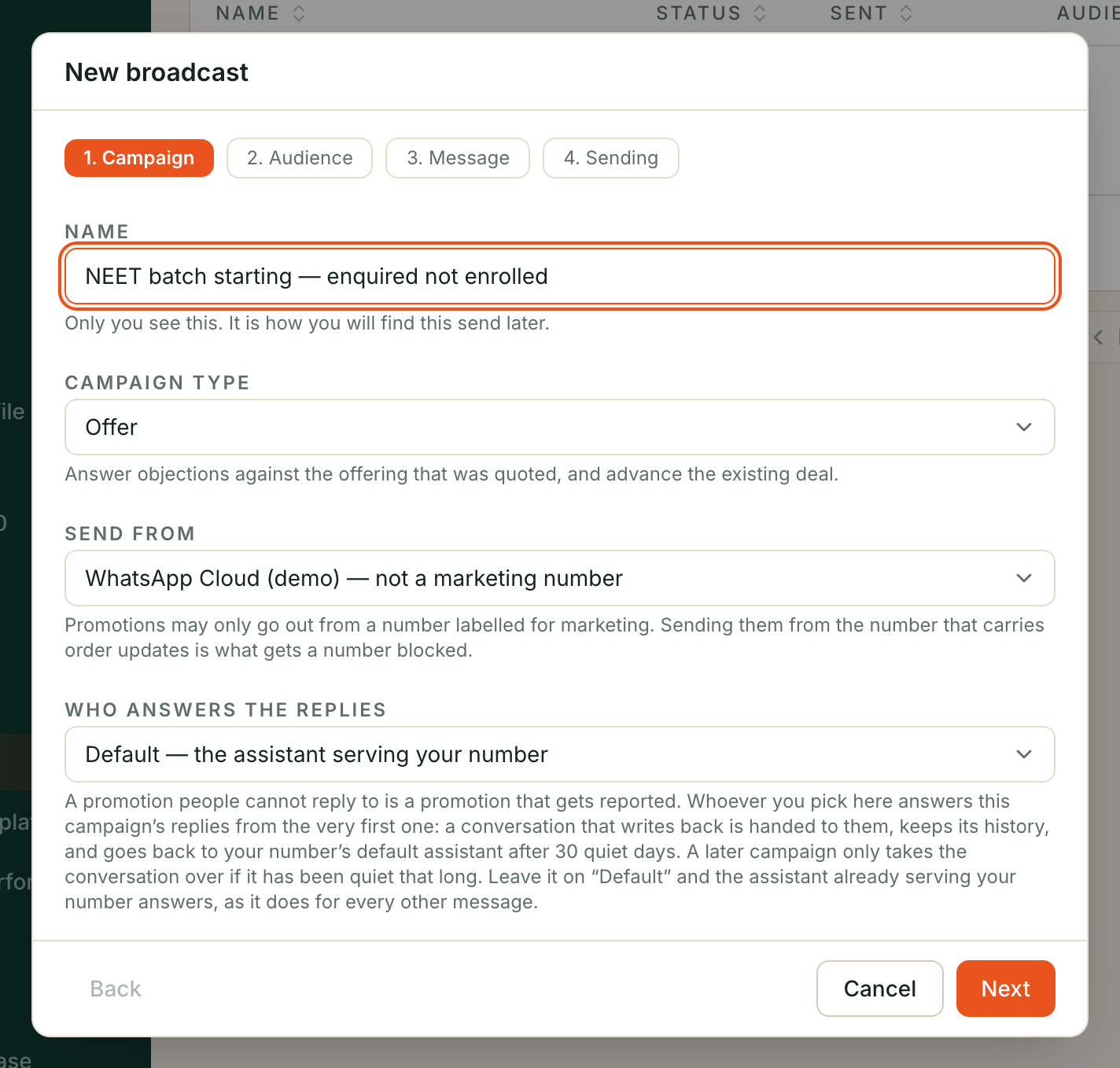
This step also asks who answers the replies. Pick one of your assistants and it handles everyone who writes back; leave it on Nobody and the replies wait in your inbox for a person. Both are real choices — but a campaign nobody is watching is the one where a customer asks a question on Friday evening and hears nothing until Monday, and that is the reply that turns into a block. If you have no assistant set up yet, the box says so rather than pretending otherwise.
Step 2 — Choose who it goes to
A campaign goes to a segment. There is no other way in, and the next section explains why pasting a list of numbers is refused rather than offered.
Segments
A segment is a saved description of a group of customers — “bought once, silent for six months” — that is worked out fresh every time it is used. It is never a list you have to keep up to date.
Six come ready-made:
| Segment | Who is in it |
|---|---|
| Stalled deals | An open deal your assistant is working, nothing heard from the customer for 7 days |
| Quoted, not bought | Had a quote, never placed an order |
| Dormant customers | Bought at some point, silent for 180 days |
| Missed us | A call in the last 30 days that never connected |
| Recent buyers | Ordered in the last 30 days |
| Clicked, didn’t reply | Clicked a link in a campaign and said nothing |
Two of these need a word of warning.
“Missed us” is narrower than it sounds. It finds calls that did not connect — no answer, busy, voicemail, a failed line — in the last 30 days. It does not find people who booked and did not turn up, because nothing records a no-show yet. If you read it as “everyone we missed”, you will send to a smaller list than you expect.
“Clicked, didn’t reply” is empty until a campaign has gone out with a tracked link. Clicks are only recorded for a campaign that was set up with one, on the Message step — until then the segment exists, is valid, and returns nobody. It is also the only one that counts people rather than taps: the link travels through forwards, so a taps figure would be one a stranger could inflate.
You can edit any of these, and build your own from contact and customer details, deal stage, how long since you last heard from someone, and what they did with a previous campaign. Your edits are never overwritten.
Segments deliberately do not filter on consent. That is so the audience count you see and the report you read afterwards agree with each other: the people without a consent record are counted, then shown to you as suppressed, rather than quietly vanishing before you ever knew they were there.
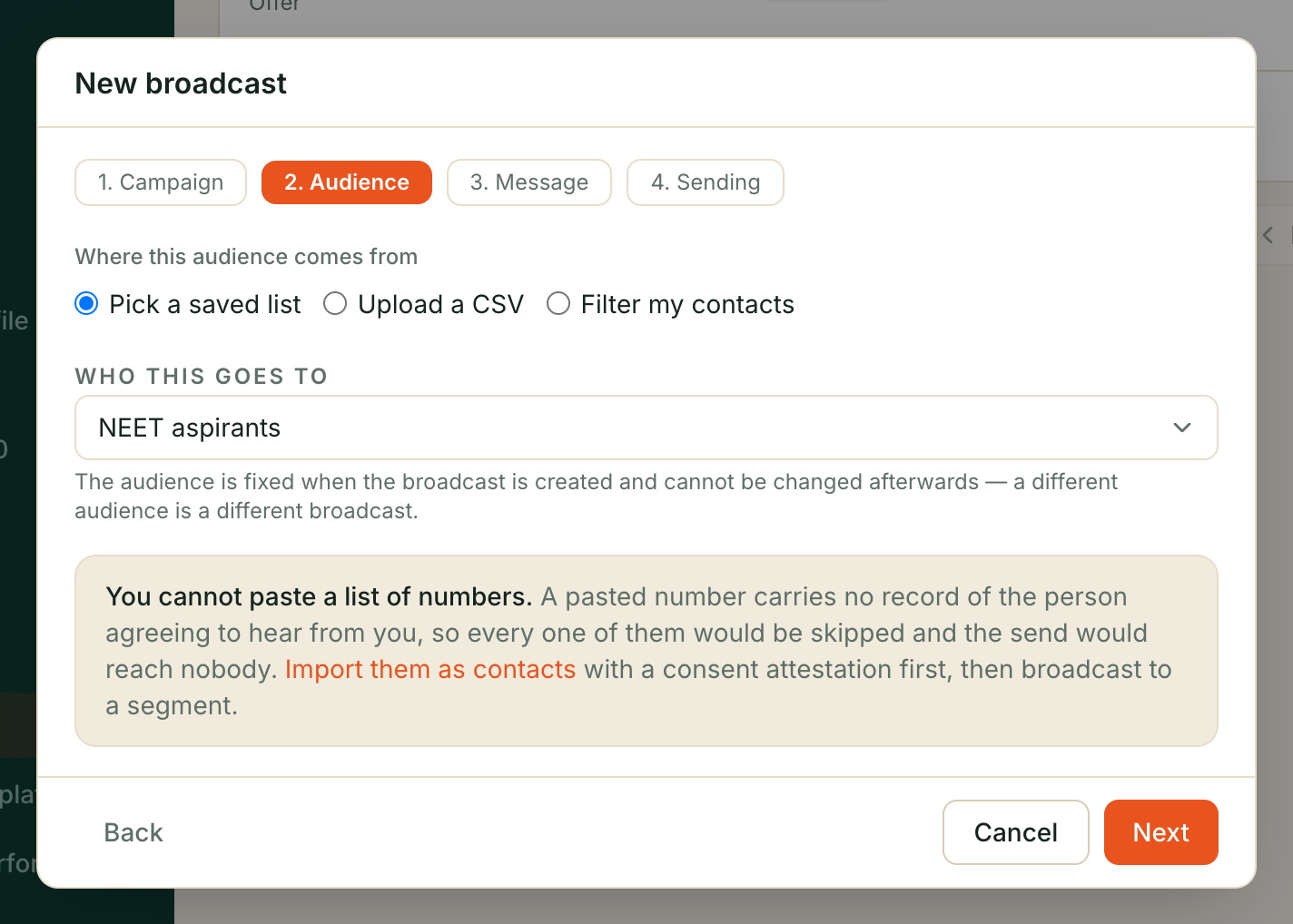
Why you cannot paste a list of numbers
You cannot hand a campaign a list of phone numbers, and the refusal happens when you create it rather than when it runs.
The reason is consent. A consent record lives on a contact, and a pasted number is not a contact — so every person in such an audience would be suppressed for having no consent on record, including numbers that belong to contacts you already have. The campaign would run, report honestly that it sent to nobody, and cost you the time you spent building it. Creating it is refused instead, with the way through named in the refusal:
An uploaded phone numbers list cannot be broadcast to: these numbers have no consent record, so every one of them would be suppressed as ‘no_consent_record’ and the broadcast would send nothing. Import them as contacts with a consent attestation first, then broadcast to a segment.
So for a list you genuinely have permission for, the route is Importing contacts with the consent attestation, and then a segment.
One campaign takes at most 50,000 people.
Step 3 — Pick the message
The message is a template: fixed wording that Meta has already approved, living in your own WhatsApp account. You cannot type a message here and send it.
The template is checked the moment the campaign is created, not at send time. If Meta’s status for it is anything other than approved — pending, rejected, paused — the campaign is refused there and then with the reason. That is on purpose: finding out at send time means several thousand rejections counted against your number’s quality rating, and that takes weeks to earn back.
Filling in the blanks
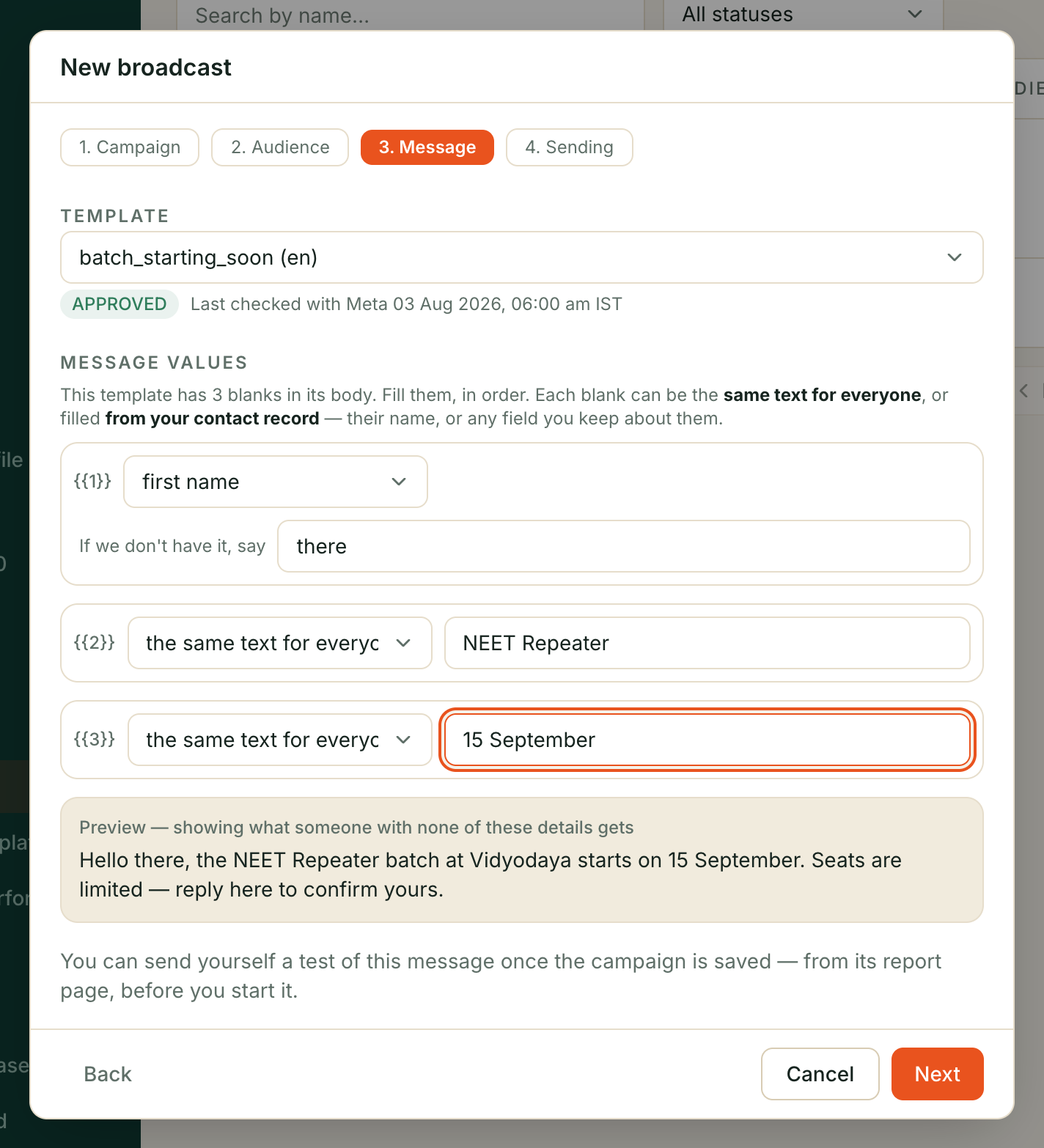
A template can have blanks in it. You say what goes in each one, once, for the whole campaign — and each blank can be either the same text for everybody, or filled from your contact record.
For each blank you pick one of:
- the same text for everyone — your business name, this month’s offer.
- name, or first name — from the contact record you already keep.
- email — their email address.
- profile name — the name WhatsApp shows for them. This is not the same as name: name is what you imported, profile name is what they set on WhatsApp. For someone who messaged you but was never on any list you uploaded, the profile name is often the only one you have.
- phone — their own phone number.
- attribute… — anything else you keep against a customer: city, plan, vehicle model, last service date. Type the field name exactly as you keep it — the box suggests the field names we have already seen on your contacts as you type, and you can still type one that is not on the list (a field you are about to import, for instance).
⚠️ Every blank you fill from a contact record needs a fallback. Not everybody has a name in your records, and someone you imported as a bare phone number has no record at all. So beside the field you also say what to put for those people — “there”, “your area”, whatever reads naturally.
This is not a formality. WhatsApp refuses a message with an empty blank, so without the fallback the campaign would fail for exactly the people the blank was meant to cover. With it, everybody still gets the message — some of them just get the general version.
Watch the line under an attribute field. It tells you how many of the people we checked actually have that field — “18 of the 25 people we checked have this.” The field name has to match what you keep exactly, including capital letters, so if you see “None of the 25 people we checked have this”, the spelling is wrong. That check matters: a misspelt field name is not an error, it just quietly gives everybody the fallback, and the message still looks personalised.
(It is a spot check, not a headcount — we look at a sample of your audience rather than every person, so the number is a guide to whether the field name is right.)
Check the preview before you save. It shows what a person actually receives, with your fallback in place. If you pick a field you did not mean to — an internal note, a reference number — the preview is where you will see it, and it is much cheaper to see it there than in a customer’s chat.
A blank whose field name we do not recognise is refused when you save, not quietly replaced with your fallback. That distinction matters: a typo in a field name would otherwise send everybody the identical “personalised” message, and nothing would look wrong.
If Meta approved the template with a media header, you can attach the header
image, video or document three ways: pick one from your library, upload a
file from your computer, or paste a public https:// link. The first two go to
WhatsApp through your own number and are the more reliable: a pasted link is
fetched by WhatsApp again for every recipient, and a link that dies mid-campaign
fails the rest of the sends. The kind of file is fixed by the approved template,
and the box names the limit for the one you have — a JPEG or PNG up to 5MB, an
MP4 or 3GPP video up to 16MB, or a PDF, Office document or text file up to
25MB. A file of the wrong kind is refused when you attach it, not discovered per
recipient.
Or pick from your library appears whenever Files you send holds something of the right kind. It is the right choice for anything you use more than once — a brochure, the price list, a seasonal creative — because the file is sent to WhatsApp once and then reused, instead of once per campaign. Only files matching the template’s format are listed, and archived ones are not offered.
The three are one slot, not three: choosing a file or a library entry clears a link you had pasted, and the header carries whichever you picked last.
⚠️ An uploaded file has a shelf life. WhatsApp keeps an upload for about 30 days. A campaign started later than that refuses to start and asks you to upload the file again — which you can do while it is a draft, scheduled, or paused. A library file is refreshed for you when its 30 days are up, so it does not go stale the same way. A pasted link has no clock, but the link must stay alive for as long as the campaign runs.
If Meta approved the template with a text header that has a blank in it
(Hi {{1}} above the message body), the wizard shows a Header text box for
that one value. It follows the same rule as the message values: whatever you
type is sent to everyone exactly as written — the only per-person fill is
{{phone_number}}. A text header with no blank needs nothing and gets no box.
If Meta approved the template with buttons, each one gets its own box on the Message step, labelled with the button’s own text. A quick reply takes the answer that comes back when someone taps it; a link button whose address was approved with a blank on the end takes the part that goes on the end. The boxes you see are the buttons Meta approved — there is no box for a button the template does not have, and none for a link button whose address is fixed, because a fixed address has nowhere to put anything.
If Meta approved the template as a carousel, the Message step shows one card per approved card, each with its picture and its values. You cannot add or remove cards: the number has to match what Meta approved, and a carousel with a card missing is one WhatsApp will not render.
One link button can carry a tracked address, and then the report can tell you who opened it. Fill in Where the button sends people. If the template has more than one link button that could carry it, you pick which; if it has exactly one, that one is used unless you say otherwise. Everyone gets their own link — that is how the count works — and we never tell anyone else who tapped what.
Whatever you supply is one specification for the whole campaign, and it is checked against Meta’s copy of the template the moment the campaign is created — a button aimed at the wrong kind of slot, or a carousel with fewer than two or more than ten cards, is refused there rather than sent in pieces. See WhatsApp templates.
Step 4 — Say when it goes out
| Setting | What it does | Default |
|---|---|---|
| Time zone | Which clock the sending hours are read in | Asia/Kolkata |
| Messages per hour | The pace | 250 |
| Send only after | Nothing goes out before this time of day | 09:00 |
| Stop sending at | Nothing goes out after this time of day | 20:00 |
| When it goes out | Save as a draft, start sending now, or at a time you pick | Save as a draft |
| Start at | The moment a scheduled campaign starts itself. Only shown for At a time I pick | Blank |
The sending hours matter more than the pace does. As the screen puts it, a promotion that arrives at 3am is the one people block — and the block is permanent while the campaign is not. Overnight windows work: 9am to 9pm, or 8pm to 8am. You cannot switch the hours off. Clearing one of the two fields does not widen the campaign — whichever side you leave blank is filled back in at 09:00 or 20:00 when the campaign is saved, and clearing both fills in both. A new campaign always has sending hours.
When it goes out has three answers, and you pick one:
- Save as a draft — nothing goes out until you open the campaign and start it yourself. This is the default.
- Start sending now — the campaign is created, and the screen that follows tells you how many people it reaches and how many are held back. The button on that screen is what actually starts the send: nothing goes out before you have seen those numbers. Choose Not now and you are left with an ordinary draft.
- At a time I pick — the campaign is saved as scheduled and starts itself at that moment. Your Start at time is read in the time zone above.
Now still means within your sending hours. Neither Start sending now nor a scheduled start overrides them: a campaign started at 3am is running, but no message leaves until the window opens at 09:00.
The number on that start button is the number of people who will actually be messaged — the audience minus everyone held back. It is smaller than the count the audience step showed you, because the audience step counts people before consent is checked.
Messages per hour is a ceiling, not a promise. Three other things slow a campaign below it, and all three win: your number’s daily limit at Meta, a quality rating that has gone yellow, and the frequency caps below. A new number on the smallest daily limit will stop for the day long before it has sent 250 in an hour — see Two WhatsApp numbers.
A scheduled campaign starts itself when its time arrives. It is re-checked at that moment, not at the moment you scheduled it: if the number is no longer marked for marketing, or its quality rating has gone red in the meantime, it starts and immediately pauses instead of sending. A campaign scheduled three weeks ago must not go out on a number that has changed since.
Step 5 — Start it, and watch it
A campaign can be started, paused, resumed and cancelled. Cancelled is final. Pausing stops it where it is; nobody is sent to twice.
While it runs, every recipient is decided one at a time, immediately before the message goes out. That is the important bit: someone who opts out an hour after you press start is not sent to, even though they were in the audience when you built it.
Five reasons a person is skipped, and all five show up in the report by name:
| Reason, as the report words it | What happened |
|---|---|
| Opted out | They told you to stop sending marketing messages. Only they can undo that — no one on your side can |
| On your do-not-contact list | Their number is on that list. That may be the customer’s own stop, or an entry someone on your team added — the report cannot tell which |
| No consent on record | You have no record of them agreeing to marketing messages |
| Messaged too recently | They already had a message inside the 24-hour or 7-day cap, or they appeared twice in this send |
| Not a usable phone number | What you hold could not be turned into a sendable number, so nothing was attempted |
The frequency caps, plainly
At most one marketing message per phone number per 24 hours, and four per rolling 7 days. Not per campaign — per number, across everything you send. Four campaigns running at once cannot between them send one person four messages in a morning.
Two things people get wrong about them:
- They count per business, not across Kooday. If two Kooday customers both message the same person, neither one knows about the other and neither one is slowed down by the other. We are not able to coordinate that, and we do not pretend to.
- No plan raises them. They can only ever be tightened. Our billing for campaigns is per send, which gives us an interest in you sending more, and these caps exist to make you send fewer — so the answer was settled once, permanently, in the customer’s favour. Nobody can sell you a higher ceiling.
If your number’s quality drops
Meta scores every WhatsApp number. If yours drops to red, every running campaign on it is paused immediately, and the reason is recorded.
It does not restart when the rating recovers. A person has to look at what went out and press resume. That is deliberate rather than an oversight: a red rating means something you sent went badly, and the one thing that must not happen next is the same campaign quietly resuming at 9am and finishing the job.
What a reply does
A reply to a campaign is an ordinary WhatsApp message. It arrives in your Inbox, your assistant answers it, and if it looks like a lead your intake rules turn it into a deal exactly as they would any other chat — see Setting up your sales pipeline.
What is added is the link back. A reply within 72 hours of the message is credited to that campaign, and so is any deal that comes out of it. That is what lets the report say “41 deals, ₹6.2 lakh of pipeline” instead of a delivery percentage.
Three rules worth knowing:
- 72 hours, from the moment the message was sent.
- The most recent campaign wins, and only one is credited. Someone who got two campaigns this week and then replies is credited to the later one. A reply is one event; letting it count for two campaigns would inflate the only number we are asking you to trust.
- It is credited once and never changed afterwards. A later campaign cannot take a reply that has already been counted.
⚠️ Only WhatsApp replies are credited. A campaign goes out by phone number, so if a customer answers you instead on Instagram, Messenger or your website chat instead, that conversation is handled normally but is not counted against the campaign. Your real response is a little higher than the report says.
What it costs
Two separate bills, and it is worth keeping them separate in your head.
- Meta charges you for each marketing message, directly, at their rates. That bill is between you and Meta and is the same whichever tool you send from.
- Kooday charges a per-send fee, plus the monthly add-on fee — when one is set on your account. There is no per-send price set today, so campaign sending currently costs you nothing on our side, and the campaign report says as much rather than showing a zero.
A send is counted when the message leaves for Meta. Somebody who was skipped — opted out, no consent on record, over the cap — is never counted.
When a fee is set, it appears on your invoice as its own line, with the send count behind it, so the charge can be checked against the same number the campaign report shows. No fee set means no line at all, and neither does a period in which you sent nothing — you will not see a ₹0.00 row for either.
See What a campaign cost for how the report shows this, and for our estimate of the Meta side.
Troubleshooting
Nothing is going out
Work down this list:
- Is it inside the sending hours you set? A campaign outside its window is running and sending nothing, which looks identical to being stuck.
- Is it paused? Check the reason. Quality rating red means somebody has to look before pressing resume.
- Are the blanks in your template fillable? A blank that cannot be filled skips that person, and if it cannot be filled for anybody, it skips everybody.
- Is the number still marked for marketing? The check runs on every pass, not only at the start.
- Has the number used up its daily limit at Meta? The campaign carries on tomorrow. A new number’s limit is small.
Far fewer people got it than were in the audience
Open the report’s audience section — every skipped person is there with a reason. The usual answer is No consent on record: the audience count is honest about who was selected, and the suppression list is honest about who could not be sent to.
Everyone was skipped as “No consent on record”
You have no record of opt-in for those contacts — see Importing contacts. This is the one refusal that has no override, and it is also why a campaign cannot be created from a pasted list of numbers in the first place.
A customer says they got two in one day
They did not get two from you — the cap makes that impossible. Either another business messaged them, or the second message was an order update rather than a promotion. Order updates are not marketing and are not capped.
Someone replied and no deal appeared
Same reasons as any other chat: your intake rules may not match what the conversation was about, or the deal already exists. See Setting up your sales pipeline. If they replied on Instagram rather than WhatsApp, the deal is real but is not credited to the campaign.
Still stuck? We answer support mail the same working day.
Email support