Reading your sales report
The How it's selling card above your pipeline board — what each number counts, which sales approaches are actually winning, why a high "ruled out early" figure is good news, and why a blank is not a zero.
Your board shows what your assistant sold. The card above it shows how it sold — whether it actually asked for the business, what happened when someone pushed back, and where conversations stop.
It is called How it’s selling, it sits at the top of the Pipeline page, and it always covers the last 30 days. There is no date picker: the board underneath has no date range either, and a window nobody chose is not one you should be reading against.
The card appears only if your plan includes the sales pipeline. If it is not there at all, that is why — nothing is broken, and your board still works exactly as it did.
What you see before you open it
Collapsed, the card is one line: how many conversations it is reading, and the single number worth seeing at a glance.
How it’s selling ·
48 conversations· last 30 days → 62% asked for the business
Click it to open the rest.
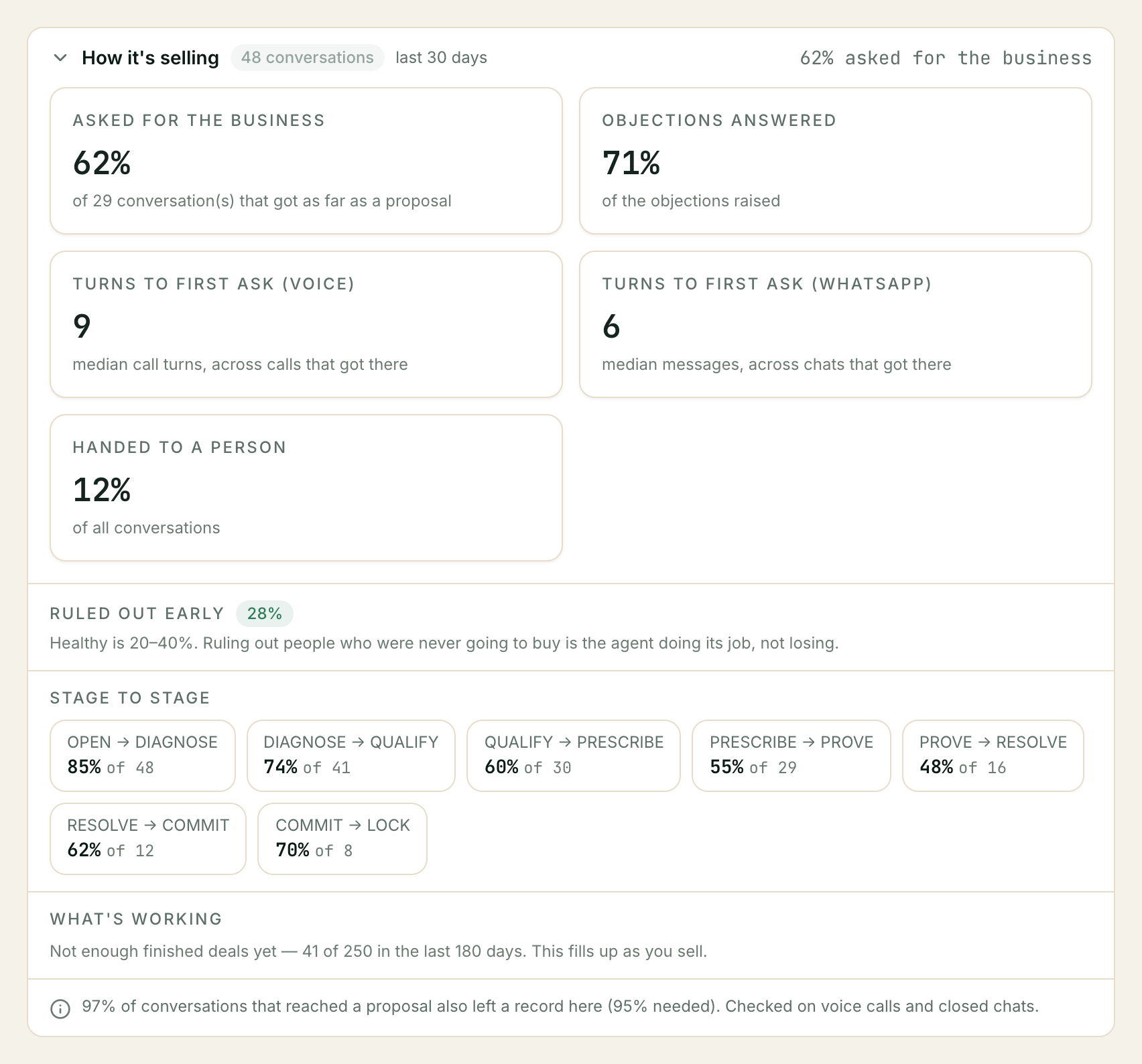
The five numbers
Asked for the business
Of the conversations that got as far as a proposal, how many ended with your assistant actually asking for the order.
The denominator is the part to hold onto. It is not every conversation — it is only the ones that reached the point where a recommendation was on the table. A conversation where someone asked for your address and left was never a conversation that could be closed, and counting it would make a working assistant look timid.
The card names the denominator underneath, as of N conversations that got as far as a proposal.
Low here is worth acting on. It means your assistant is recommending and then not asking. That is nearly always a gap in your instructions — no next-step asset, so it has nothing concrete to close for. See what you have to give it.
Objections answered
Of the objections raised, how many were resolved rather than left hanging.
It never reads above 100%, even in the odd case where the counting disagrees with itself — a rate over 100% on a dashboard reads as a broken dashboard and buries what it was trying to tell you.
Turns to first ask
How long it took to get to the ask — the median, across the conversations that got there at all.
There is one of these per channel and never a combined figure, and the reason is in the unit. On a call a “turn” is one exchange your assistant took; in a chat it is a message. Averaging the two produces a number that moves when your channel mix moves and nothing about the selling changed at all. Each card names its own unit underneath, so read them side by side rather than adding them up.
Handed to a person
Of all conversations, how many your assistant stopped and handed over.
This is the same handoff that emails you, if you have that switched on — see Getting told when a deal needs you. A rising number here is not automatically bad: it usually means your assistant is meeting questions your knowledge base does not answer, which is a content gap you can close.
Ruled out early
The one people misread. Its own section, below.
Ruled out early: high is the healthy answer
⚠️ A high disqualification rate is your assistant working, not failing. 20–40% is the healthy band, and the card shows anything inside it in the same green it uses for good news. That is deliberate.
Your assistant is built to reach a correct decision quickly, not a positive one. When two or more of the hard disqualifiers in your instructions turn out to be true, it says so kindly, points the person somewhere better, and stops — see How your assistant sells.
So a third of conversations ending in a clean no is the expected shape of good selling. Every one of those is a conversation nobody on your team now has to work, a callback nobody has to make, and a deal that will not sit on your board for three weeks before someone marks it Lost.
What to do at each end of the band:
| What you see | What it usually means |
|---|---|
| 20–40% (green) | Working. Nothing to do. |
| Well below 20% | Your instructions have no hard disqualifiers, or they are too narrow to exclude anybody. Your assistant cannot rule out a fit you never described. |
| Well above 40% | Your disqualifiers are catching people you would actually serve, or your enquiries genuinely are mostly out of area or out of budget — which is a marketing finding, not an assistant one. |
| A dash | Not measured. See below. |
The thing not to do is ask us to push it down. Pushing it down means selling to people who were never going to buy.
Stage to stage
Underneath, one small box per step of the sequence your assistant works through — Open → Diagnose → Qualify → Prescribe → Prove → Resolve → Commit → Lock — showing what share of the conversations that reached a step went on to the next one, and how many that was of.
Two things about it:
- Only neighbouring steps are compared. There is no Open → Commit figure, because nothing makes that jump meaningfully.
- A step nobody reached is simply absent, not shown as 0%. Its box does not appear.
Disqualify never appears here, and that is on purpose. It is a way off the sequence, reachable from any point — not the rung after Lock. Putting it in this list would invent a conversion nobody makes.
If no step was entered often enough to compare, you get one line saying so instead of an empty row.
What’s working: which approaches are winning
Underneath Stage to stage is a section called What’s working. Your assistant records which play it used at each turn — reframing the choice, offering a cheaper option, recapping before it asks — and this section lines those up against whether the deal was eventually won.
Two different windows are at work here, and it matters which is which.
- Whether these figures appear at all is decided over the last 180 days, because “has this business closed enough to compare anything” is a question about your business, not about the month you happen to be looking at.
- The figures themselves — each approach’s line, and the counts underneath — are for the same 30 days as the rest of the card.
A deal counts as finished whether it was won, lost, or gave up and went quiet.
Most businesses will only ever see one line here, and that is the honest answer
⚠️ It takes 250 finished deals in 180 days before any of these percentages appear. Below that you get a single line — Not enough finished deals yet — 41 of 250 in the last 180 days. This fills up as you sell. — and nothing else.
That is not a placeholder and it is not a bug. Comparing two approaches means telling a real difference from a run of luck, and at forty finished deals a month there is no arithmetic that can do it. Showing you a percentage anyway would be showing you noise with a decimal point on it.
The line names the real gap, and there is more than one thing that can cause it:
| The line says | What it means | What helps |
|---|---|---|
| Not enough finished deals yet — 41 of 250 | You have not closed enough business in 180 days | Keep selling. This one fills up on its own. |
| Only 87% of conversations left a record to check these against (95% needed) | Your selling is fine; the recording of it is incomplete | Conversations are ending without a summary — usually a channel or an assistant that is not finishing cleanly |
| This window was too large to read in full | More finished deals than we read in one pass | Nothing. Every figure is withheld rather than worked out from a slice |
| No end-of-conversation records to check these against | Nothing at all was recorded to cross-check | As above — conversations are not finishing cleanly |
| Conversations are leaving records just short of the level needed | You are fractionally under the bar | Almost nothing; this one usually clears itself |
All the failing reasons are listed, not just the first — fixing one and finding it still silent is the worst way to learn there were three.
When it does have enough
Each approach gets a line: what it is called, how often deals using it were won, and both numbers that percentage came from.
Reframing the choice — 60% · 24 of 40 finished
The second half is the part to read. A percentage on its own hides whether it rests on forty deals or on four.
- A dash instead of a percentage means that approach has not been used on enough finished deals yet. It needs 40 finished deals in this window, with at least 12 won and 12 not won, before a rate appears. The counts still show — 3 of 8 finished — too few to compare yet — because a count is a fact even when a rate is not.
⚠️ Those 40 have to fall inside the card’s 30 days, not the 180. So even a business past the 250-deal gate will usually see counts and dashes rather than percentages, and only its most-used approaches will ever carry a rate.
- An approach you know your assistant uses may not be listed at all. That is deliberate, and the section says which ones and why.
Approaches that are named but have no number
Before an approach can be scored, we check the labels against the real conversations they came from. Where we cannot yet vouch for a label, the approach is named with no number beside it rather than given a percentage nobody should act on. The wording tells you which of these happened, and the first three want different responses:
| The line says | What it means | What helps |
|---|---|---|
| Not checked yet | We have not reviewed this approach against real conversations at all | Time |
| Seen too rarely to be sure of | It has come up, but not often enough to trust the label | More conversations — not a change |
| Not reliable enough to show | The approach is being recognised inconsistently | More time will not fix this. Tell us. |
| Not recognised | A fault on our side, not anything about your selling | Tell us — it is a bug |
| Not shown | Something we have not seen before is holding it back | Tell us |
The line about held-back deals
Above the gate only — like the per-approach lines, this is part of what replaces the status line. It reads something like:
225 of 300 finished deals count toward suggestions. The other 75 were held back: 62 ruled out early, 9 flagged as implausible, 14 with an incomplete record — some for more than one reason.
Two different populations, side by side on purpose. Every finished deal is counted in the percentages above — including the ones your assistant ruled out early, which are the healthy ones (see above). The smaller number is what would be allowed to feed a suggestion, which is a stricter bar: a deal carrying a conversation that looked like scripted traffic, or one whose record is incomplete, is fine to count and not fine to draw a recommendation from.
The reasons overlap — one deal can be ruled out early and have an incomplete record — so they add up to more than the total (62 + 9 + 14 = 85, against 75 held back). The line says so when they do, rather than leaving you to subtract. Where they happen not to overlap it ends at the full stop instead.
If you also see some too old to tell either way, those are deals that finished before we started recording whether they were ruled out. They are held back rather than guessed at.
If nothing has been recorded at all
No approach has been recorded against a finished deal yet. Your assistant records the play it used only when it is running a sales method — see Choosing how your assistant sounds.
”Not measured” is not “0%”
⚠️ A dash is not a zero. Every rate on this card goes blank —
—— when there was nothing to divide by. An assistant nobody asked to close is not an assistant that failed to close, and the card refuses to let those two look alike.
Three things make a figure, or the whole card, unmeasured:
| What happened | What you see |
|---|---|
| No sales conversations in the window | Not measured in this period. No sales conversations were recorded. |
| The conversations came from an assistant with no sales method attached | The card says how many, and leaves them out of every number |
| Too many conversations to read in full | This window was too large to read in full. Every rate is withheld |
The third is the surprising one. A window your assistant was too busy for is a window where every rate would be worked out from the oldest slice and presented as the whole thing — a wrong number wearing the costume of a right one. Withholding it is the honest answer.
A brand-new assistant shows “not measured” and should. It is the card telling you it has nothing yet, not the card being broken.
The line at the bottom
A small note under everything, and it appears even when nothing is wrong — a note you only ever see in trouble is one whose absence you start reading as a guarantee.
It says up to five things:
- How complete the reading is. “97% of conversations that reached a proposal also left a record here (95% needed)” — the card cross-checks itself against the end-of-conversation summaries and tells you how much of it matched.
- What was checked. “Checked on voice calls and closed chats.” Older deployments say “Checked on voice calls only”, because for a while only calls stored a summary to check against. The line reports what was actually checked; it never overstates it.
- Conversations left out because the assistant they came from has no sales method attached.
- Conversations excluded as implausible traffic — a burst that looks scripted rather than human. The count is always shown; an exclusion you cannot see is indistinguishable from having no attackers.
- Not enough evidence here to compare one prompt against another — when the window is too thin or too incomplete to draw a conclusion from.
”Pushing too hard”
If your assistant asked for the business more than three times in a single conversation, a red panel appears on the card, and it appears whether or not the rest of the card could be measured.
Three asks is the limit the sales method sets for itself; a fourth is a rule being broken on a real customer, which is an incident rather than a statistic. So it does not hide behind the expand arrow, and it does not disappear when a busy window withholds the rates — a breach found in a partial reading is still a breach. The panel says how many conversations, the worst count, and whether any of them looked like scripted traffic.
Troubleshooting
The card is not on my Pipeline page
Either your plan does not include the sales pipeline, or the report could not be loaded. The card stays silent rather than putting an error panel between you and your deals — the board is the page, and this is commentary on it.
Every number is a dash
The window has nothing measurable in it. Work down the three causes in “Not measured” is not “0%” above — most often it is a new assistant, or one created without the Sales persona.
The numbers dropped when I copied the persona
A copy of the persona is no longer a version we can compare against, so its conversations stop being attributed and show up in the note at the bottom as uncounted. That is the trade for editing your own copy — see Choosing how your assistant sounds.
”What’s working” only shows me one line about 250 deals
That is the section working. It needs 250 finished deals in 180 days before any percentage is reliable, and most businesses never reach it — see Most businesses will only ever see one line here. The count in that line is real and it moves as you close business.
An approach is missing from “What’s working”
Either it has not been used on a finished deal in the last 30 days, or we cannot yet vouch for its label — in which case it is listed by name lower down with the reason. An approach that is genuinely missing from both places has not been recorded at all.
It says 20 conversations and my board has 60 deals
They count different things. The card counts conversations your assistant sold in; the board counts deals, which can be created from a call outcome with no selling in it at all, and which live on long after the conversation ended.
Related: Teaching your assistant · How your assistant sells · Setting up your sales pipeline · Your inbox and taking over · Building a report
Still stuck? We answer support mail the same working day.
Email support