Importing your contacts
The file format, what happens to a bad row, and the consent record a contact needs before any promotion can be sent to them.
If you already have a customer list — in a spreadsheet, in your old billing software, in a notebook somebody typed up — you can bring it in as a file rather than adding people one at a time.
Where to find it: open Contacts in your dashboard, then Import contacts. You need admin access.
⚠️ Having someone’s number is not the same as being allowed to promote to them. Importing a list gets them into Kooday. It does not make them contactable for offers — that needs a record of when and how they agreed, and it is the second half of this page.
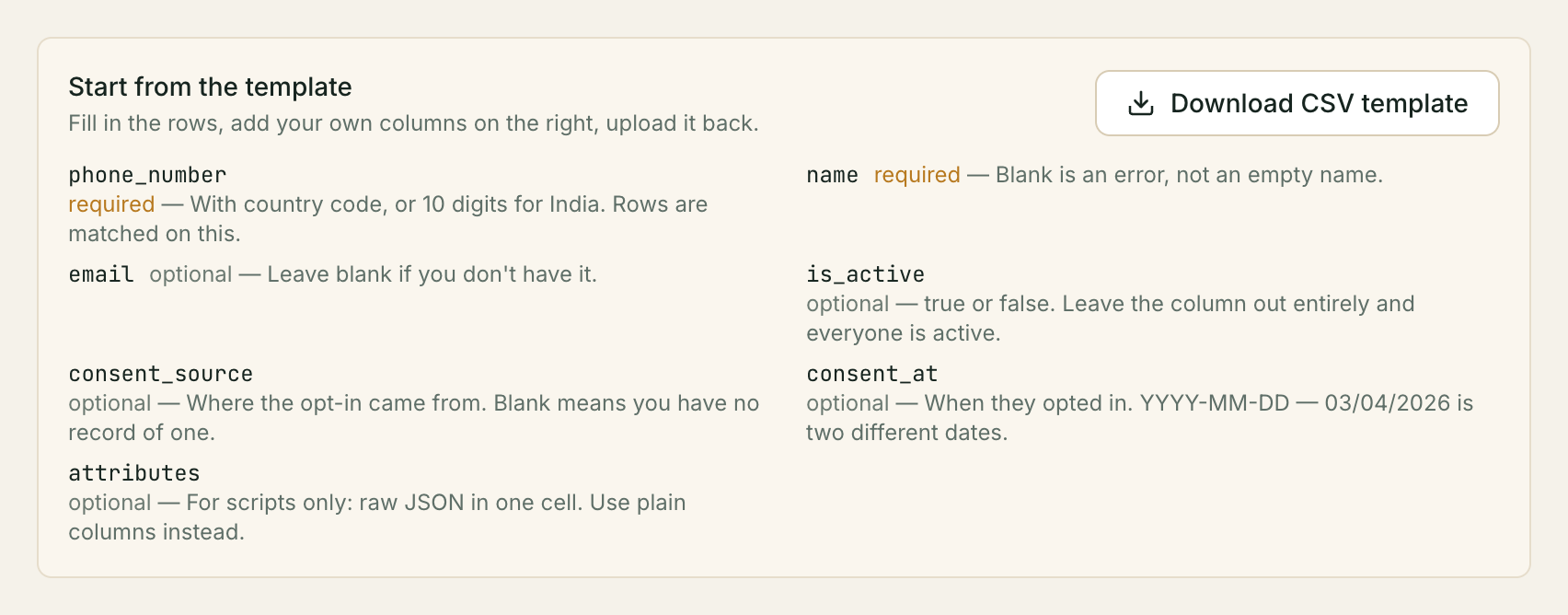
The file
A CSV or a JSON file, up to 5 MB.
Start from the template. On the import screen, click Download CSV template. It arrives with every column already named, so nothing depends on you spelling a heading correctly — open it in Excel, Numbers or Google Sheets, fill in the rows, save as CSV, upload it back.
These are the columns Kooday knows by name:
| Column | Required | Notes |
|---|---|---|
phone_number | Yes | Digits, plus spaces, +, brackets and dashes. A ten-digit number is read as Indian and stored as +91…. A cell with letters in it, or with no digits, fails that row |
name | Yes | Cannot be blank |
email | No | Blank is fine |
is_active | No | true/false, yes/no, 1/0. Blank means active |
consent_source | No | Where their agreement to hear from you came from — see Consent |
consent_at | No | When. Ignored unless consent_source is filled in too |
Add your own columns
Anything else you know about a customer goes in a column of your own. Name it whatever makes sense to you:
phone_number,name,email,vehicle number,service due
9000000001,Priya Menon,priya@example.com,KL01AB1234,2026-09-15
+91 90000 00002,Ravi Kumar,,KL02CD5678,
Kooday saves each of those under the contact as an attribute, tidying the
heading into a key: vehicle number is stored as vehicle_number. Spaces,
capitals and dashes are all fine in the heading — Vehicle Number,
vehicle-number and vehicle_number all arrive as the same thing.
You can then use any of these in a WhatsApp campaign by choosing attribute and typing the name.
Check the list we show you after the upload. We name every column that was saved as an attribute. This is worth ten seconds of your time: if you typed
emialinstead ofemial, the import succeeds, and nothing else would tell you. Seeing it in that list is how you catch it.
Two headings that tidy down to the same key — vehicle number and
Vehicle_Number — stop the whole file, so rename one. Nothing is imported until
you do.
Importing the same people again
Your columns decide what changes. Nothing outside them is touched.
| In your file | What happens |
|---|---|
| A column with a value in it | That detail is updated |
| A column left blank | That detail is removed — this is how you clear something you got wrong |
| A column your file doesn’t have | Left exactly as it was |
So a quick correction is safe. A file with just phone_number and the one
column you’re fixing changes that one thing and nothing else — you don’t have to
re-send everything you know about somebody to avoid losing it.
And if you do want to remove a detail, include its column and leave the cell empty. That is a deliberate act rather than something that can happen by accident.
Anyone not in the file at all is untouched.
The attributes column (for scripts)
If you generate your file with a script, you can still send a single
attributes column holding raw JSON — one cell per row, with the quotes inside
doubled:
phone_number,name,attributes
9000000001,Priya Menon,"{""city"":""Kochi"",""plan"":""annual""}"
You rarely want this by hand: a spreadsheet re-escapes the quotes you type when it exports, so the file arrives double-escaped. Plain columns above avoid the problem entirely. If you send both, your plain columns win where they overlap.
The same merge rule applies key by key: a key you send is updated, a key set to
null is removed, and a key you leave out is untouched. This changed in
August 2026 — the attributes object used to replace the whole bag, so a
script that relied on sending a complete object each time now needs to send
null for anything it means to remove.
An invalid attributes cell fails that one row and nothing else.
Rows are matched on the phone number
Importing the same file twice does not create duplicates. A phone number already in
your contacts is updated; a new one is created. The number is tidied into a
standard form first, so +91 90000 00001 and 9000000001 are the same person.
That makes the import safe to re-run, which is the usual way people use it: export from the old system, import, notice three columns are wrong, fix them, import again.
The other place this runs
The same import — same file rules, same consent attestation — also runs from inside a broadcast, on the Audience step, when you choose Upload a CSV. It imports the contacts and builds a list of exactly that upload in one go. See Segments.
Nothing about the file or the consent rules changes; it is the same endpoint.
What you get back
Three figures — created, updated, skipped — and, if anything was skipped, a table of exactly which rows and why.
A bad row never stops the import. The good rows go in, the bad rows are listed, and you fix those and re-upload. The reasons are plain: phone_number is required, name is required, attributes is not valid JSON, invalid is_active value.
A file that cannot be read at all does not fail loudly — it comes back as a single skipped row reading could not parse file: …, with nothing imported. Same table, same place to look; there is just one line in it.
Consent
Before Kooday will send anyone a promotion, it needs a consent record on that contact: where their agreement to hear from you came from, and when.
This is not a checkbox you tick to unlock sending. It is a record of something you already have — the form they filled in, the box on your order page, the sheet in the shop.
⚠️ We record what you tell us. We do not check it, and it does not make you compliant with anything. Meta’s rules require you to hold the opt-in. Whether you do is a fact about your business that nothing in this software can see. What Kooday does is keep the record, and refuse to send to anyone who has none.
What happens without one
A contact with no consent record is not sent to. They stay in the audience count, they appear in the campaign report as no consent record, and no message goes out to them.
They are shown rather than quietly dropped on purpose. A campaign that silently messaged 300 of the 1,000 people you selected, with no explanation, teaches you nothing. One that says “700 had no consent record” tells you exactly what to go and fix.
Consent and opting out are different things, in different directions
They look like two ends of one switch and they are not.
| A consent record | An opt-out | |
|---|---|---|
| Who it comes from | You — “they agreed, here is where” | The customer — “stop” |
| What it does | Allows promotions | Stops them |
| Who can change it | You | Only the customer |
A consent record never overrides an opt-out. Somebody who said stop stays stopped, whatever your list says about them, and re-importing a file cannot undo it. Nobody on your team, and nobody here, can put a customer back — see When a customer asks you to stop for why that is deliberate.
Recording consent
Once a contact has a consent source, campaigns can send to them. There are three ways to put one there, and every one of them asks you the same question first.
1. In the file. Add a consent_source column (and optionally consent_at).
On the import screen, pick the source and tick the box that says your business
holds the opt-in. A file that carries a consent_source column and arrives
without that box ticked is refused whole — “this file carries a consent_source,
so it needs an explicit attestation…” — and nothing is imported.
2. One contact at a time. The new-contact and edit-contact forms have the same source picker and the same box. Setting a source without ticking it is refused the same way.
3. For people already in your book. Select them on the Contacts list and choose Record consent…. Pick the source, the date if you know it, tick the box, and it applies to everyone selected — no re-import, no file. There is a limit on how many one claim may cover; a very large selection is refused rather than trimmed, because a claim you cannot stand behind is worse than a slow afternoon.
However you do it, we write down that you told us: who, when, how many contacts, and which sources were claimed. That is not us checking up on you. It is so that if anyone ever asks where a customer’s permission came from, the answer exists and is yours.
Two smaller rules worth knowing:
- Leaving the column out never retracts anything. Re-importing the same list with the consent columns dropped — the ordinary name-and-email refresh — leaves the existing record alone. Removing one has to be a deliberate act, not a side effect of a spreadsheet export.
- A date on its own is discarded.
consent_atwithoutconsent_sourceis not a record of where an opt-in came from, and storing it would make the contact look provenanced everywhere the pair is shown.
What is worth deciding before you fill the column in, or have that conversation:
- A source is a real answer, not a category — “the enquiry form on our website”, “the tick box at checkout”, “the register in the shop”.
- One source can cover a whole import, if that is the truth. A list exported from your booking system where everyone booked through the same form has one source.
- A number you bought, scraped, or copied out of a WhatsApp group has no source. That is not a gap to work around. It is the answer, and those contacts should stay out of your promotional campaigns.
Troubleshooting
Every row was skipped
Check the header line. phone_number and name are matched in lower case with
underscores, and every row fails without them.
A heading like Phone Number is caught for you: we stop the file and tell you to rename it, rather than saving it as an attribute and then complaining the phone number is missing.
A heading we cannot recognise as one of ours — Mobile, Full Name — is a
different matter. We will not guess what you meant, because guessing wrong
means quietly writing the wrong column. It becomes an attribute of that name,
which is why the list of saved-as-attribute columns is worth reading after
every upload: seeing mobile there tells you the phone column was never
filled.
”attributes is not valid JSON”
You only see this if your file has a column literally called attributes
holding raw JSON. Use plain columns instead — one column per thing you know —
and the question never arises.
If you do need the JSON column, the whole object goes in one cell with every quote inside it doubled. Trouble usually comes from a file edited by hand after export.
The file was rejected outright
Only two things refuse a whole file: one over 5 MB, and one carrying a
consent_source column uploaded without the attestation box ticked (below).
Everything else is reported row by row.
A file that is not UTF-8 text, or a JSON file that is not a list of objects, is not refused — it comes back with one skipped row saying it could not be parsed, and nothing imported.
The whole file was refused because of the consent column
“This file carries a consent_source, so it needs an explicit attestation…” —
your file claims consent and the box on the upload screen was not ticked. Tick
it, pick the source, and upload again. If you are not in a position to make that
statement, import the file without the consent_source and consent_at columns
— the contacts land, simply without a consent record; see
Recording consent.
Contacts imported but campaigns will not send to them
They have no consent record. See above. This is the intended behaviour, not a missing setting, and it is the one refusal with no override.
A second cause looks identical and is not the contacts’ fault: a campaign whose audience was a pasted list of phone numbers rather than a segment has no contacts behind it at all. Kooday refuses that campaign at creation rather than letting it run and send nothing — the way through is this page: import the numbers as contacts with their consent, then build the campaign from a segment.
An imported contact is missing from a segment
Segments are worked out from what a customer has done — bought something, been quoted, gone quiet on a deal. A freshly imported contact with no history matches most of them by not being in them yet. That is correct: a list of strangers is not a list of dormant customers.
Still stuck? We answer support mail the same working day.
Email support