Suggested improvements
Kooday can draft a sales lesson for you when one approach clearly outperforms the rest — what it takes before it says anything, why approving records a candidate rather than changing anything, and why silence is usually the right answer.
Kooday looks at which of your assistant’s sales approaches actually ended in won deals. When one stands out clearly enough to be worth acting on, it drafts a lesson and puts it in a queue for you to read.
You approve it, reword it first, or turn it down. Nothing reaches a customer on its own.
Where to find it: Teaching in your dashboard (under Assistants), then the Suggestions tab. The tab needs the sales pipeline; if the pipeline is not part of your plan the tab says so and offers to add it. The rest of the Teaching page is on every plan.
Read this part first: approving changes nothing yet
⚠️ Approving a suggestion does not put it live, and does not start the test either. It records the wording as a candidate. Your customers hear exactly what they heard before, and they go on hearing it until the comparison is started.
The button says Review and approve rather than Approve for exactly that reason, and the step behind it says so again. An approved suggestion shows in your Lessons list as Approved, waiting to be tested — not Active.
⚠️ Each assistant compares one thing at a time. A comparison needs around a hundred conversations to say anything, so an assistant already running one keeps your newly approved suggestion in the queue until that finishes. The Lessons list says which state it is in: Approved, waiting to be tested means it is queued and reaching nobody; Being compared now means it is live to about half of that assistant’s conversations.
This is the difference the whole feature turns on. A machine-drafted sentence that went straight into every conversation would be a machine changing what you say to your customers. A machine-drafted sentence that waits for you, and then for a comparison, is a suggestion you can check.
What it takes before it says anything
Suggestions are off for every account by default, and turning them on is your decision to make: Teaching → Suggestions → Turn on suggestions. Nothing about that switch changes what your customers hear — it only decides whether Kooday drafts anything for you to read. The Suggestions tab tells you which of these you are in.
Once on, there is a second bar, and it is high:
| What is needed | Why |
|---|---|
| 250 finished deals in the last 180 days | Below that, a difference between two approaches cannot be told from luck |
| 40 deals using an approach, with 12 won and 12 not won | A comparison needs both sides of it |
| 95% of conversations leaving a record | The comparison is only as good as what was recorded |
| The approach’s label checked and reliable | We do not compare a label we cannot vouch for |
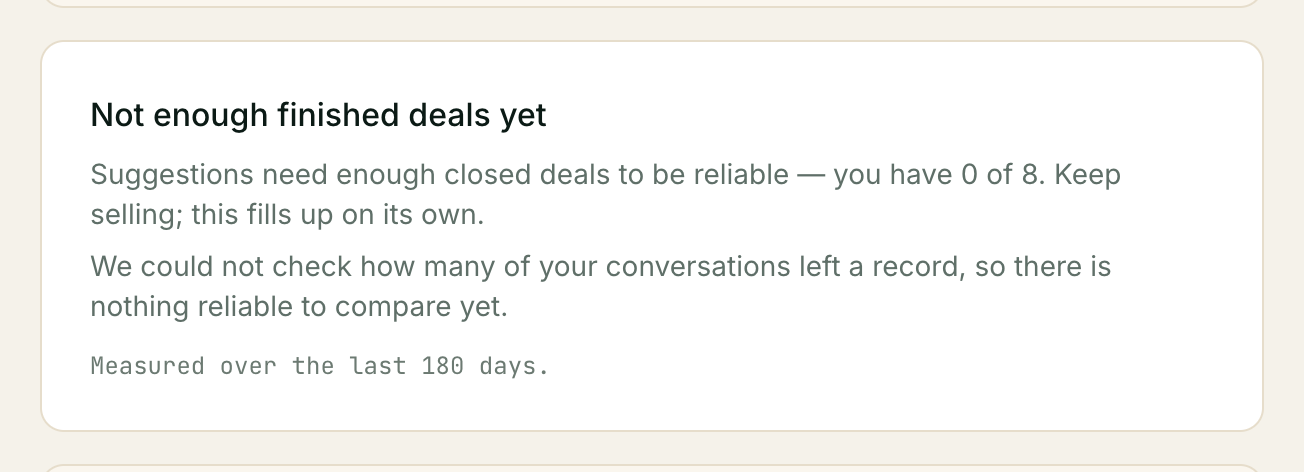
⚠️ Most businesses never reach the first line, and that is expected. At forty closed deals a month it takes over a year. The tab will say so, with your real numbers — you have 41 of 250 — rather than pretending something is coming.
That is a deliberate choice about honesty over engagement. A screen that said “still learning!” would be telling you something is happening when nothing is. Everything else on the Teaching page works regardless: the lessons you write yourself need none of this.
The four things the tab can say
| What you see | What it means |
|---|---|
| Suggestions are off | Not switched on for your account. Turn on suggestions, on that same screen |
| Not enough finished deals yet | On, and waiting. Your own numbers are on the line beneath |
| Nothing stood out this week | On, enough evidence, and no approach was clearly better |
| A list of suggestions | Something was clearly better. Read on |
”Nothing stood out this week” is a result
It is the most common outcome once you are over the bar, and it is not a failure. It means your approaches performed near enough to each other that changing one would be guessing.
A tool that produced a suggestion every week would be producing them because it was asked to, not because it found anything — and you would learn to ignore all of them, including the one that mattered. Silence here is what makes the non-silence worth reading.
Reading a suggestion
Each card carries four things.
The sentence. One or two lines of plain English — the lesson your assistant would follow. This is the only part written by a machine.
When it applies. Two chips: the approach, and what the customer was doing when it worked — when the hesitation is about cost, when somebody else has to decide, when they have gone quiet. A suggestion is never just “reframing works”; it is always “reframing works against this”, which is what makes it something you can judge.
The numbers. Underneath, in the form:
24 of 40 deals won using this, against 52 of 260 elsewhere over 180 days.
Both sides, both denominators, never a bare percentage. These are counted, not written — the sentence above them carries no figures at all, precisely so the two can never disagree. If a card says the figures behind this suggestion are missing, do not act on it; tell us.
What comparison it was held to. Ordinarily nothing is shown here. If your account has been given different thresholds from our standard ones, the card says so — a suggestion you cannot reconstruct is one you cannot check.
Your three choices
Review and approve — shows you the exact line your assistant would be given, and then Yes, approve it accepts it as a candidate. Nothing your customers hear changes; ask us when you want the comparison started.
The second click is deliberate, and it is not an “are you sure?”. Approving is the action that puts words into a conversation with your customer, so the second look is the sentence itself, shown again. Kooday may add a plain note beside it — this mentions a discount — which is information and never a block: what your business chooses to offer is your call to make.
Reword first — opens the sentence for editing, and it is your version that is kept as the candidate. Your wording and the original are both kept and shown on the card afterwards. Rewording is a perfectly good answer: it usually means the finding was right and the phrasing was not. Your edited wording is what the review step shows you.
Not useful — turns it down. One click, no second look: turning something down takes nothing away from your customers, so nothing is put in the way of it. It stays in the list marked Turned down so you can see what you have dismissed.
Decided suggestions move to Already decided under the queue.
Changing your mind after you approved
Take it back, on the suggestion itself. One click, no confirmation box, and you are not asked why.
It marks the suggestion Taken back and stops the lesson it created. If a comparison had been started for it, that comparison ends too, and any lessons that were waiting for it to finish go live. You will be told if that happens.
If enough of them were waiting to take that assistant past its five-lesson limit, you are told that too — the extras show as Active in your Lessons list but are not actually being used, and stopping one you no longer need clears it.
Taken back is deliberately not the same as Turned down. Turning something down says you never wanted it; taking it back says you approved it and changed your mind. They are different judgements about the suggestion, and Kooday keeps them apart rather than reporting you as having distrusted a suggestion you originally accepted.
You can do the same thing from the Lessons tab, with Stop using this on the row marked Approved, waiting to be tested. Same effect, whichever you reach for.
This never fails, and it never asks a question. Not while a comparison is running, not on a plan that no longer includes the sales pipeline. A business that could not stop its assistant saying something would be the one failure worth guarding against.
Things that can go wrong
The tab says suggestions are off
That is the default for every account, and turning them on is one click: Turn on suggestions, on that same screen. Nothing about it changes what your customers hear — it only decides whether Kooday drafts anything for you to read, and every draft still waits for you.
Turning them off again
There are two places, and the second one is the one that matters if your plan has changed.
Turn off suggestions, at the foot of the Suggestions tab — whether you are looking at the readiness gauge or at a queue. One click, no confirmation.
Config → Features → Suggested improvements does the same thing, and it keeps working whatever plan you are on. The Suggestions tab needs the sales pipeline to open, so if that has lapsed or been paused the tab shows you why instead of the switch, and this is where the switch is. It is the only row on that screen you can still move once the plan no longer covers it, and it moves one way: off. Turning suggestions back on needs the pipeline again.
If the pipeline is still on your plan but you have switched it off, the tab says so — Suggestions work alongside your sales pipeline, and the pipeline is switched off — and its Go to the pipeline button takes you to the switch. Nothing you have taught is lost in the meantime, and the Lessons tab beside it keeps working throughout.
⚠️ If your plan has lapsed, nothing is being drafted right now anyway — Kooday stops on its own the moment the pipeline is no longer part of your plan. What the switch changes is the future: your choice is kept rather than reset, so suggestions do not start again by themselves if the plan comes back. That is the whole reason the switch still works while the plan does not.
Either way it stops new drafts and nothing else. Lessons you have already approved are untouched and go on exactly as before; stopping one of those is Stop using this, on the lesson itself.
Suggestions need the sales pipeline
Suggestions are drafted from your closed deals, so they need the sales pipeline to be part of your plan — there is nothing to read the results of otherwise. On a plan without it the Suggestions tab is still there, and opening it tells you Suggestions is not part of your plan with a button to talk to us about adding it. Lessons never need it.
Turning suggestions off never needs it, and that is deliberate: a business that could not stop Kooday drafting things would be the one failure worth guarding against. If the pipeline has lapsed and suggestions were on, the switch is in Config → Features — see Turning them off again.
What the comparison found
Once a comparison finishes, the suggestion carries its result: whether it was kept, and what the deals looked like on each side.
One line there is worth reading carefully. Kooday decides whether a wording won by looking at how often conversations reached a proposal — not at how much those deals were worth. So a wording can win the comparison and still be closing smaller deals, and the card says so when it does:
Deals won with it were worth 30% less on average than the ones won without it.
⚠️ That is information, not advice, and it never stops a wording being kept. Winning more smaller deals is often exactly what a business intends — a clearance run, an end-of-season push, moving slow stock. That is your commercial call, and Kooday does not make it for you. If it is not what you intended, Take it back.
If your deals do not carry values, the card says so plainly rather than telling you things look fine — it cannot know either way.
When a comparison did not keep a wording, the card also says why in plain terms — not enough conversations on one side, too few of them reaching the point of an offer, or the assistant crossing a line you set more often with the new wording. That matters, because “it was not kept” and “there was never enough to read” are different answers and only one of them is about the wording.
A comparison that never had enough conversations
A comparison needs a certain number of conversations on each side before it can say anything at all. On a quieter assistant that can simply never happen.
Kooday does not leave it running for ever. After about two months it stops the comparison and tells you so:
We could not finish comparing this. This assistant did not have enough conversations to read a result, so we stopped the comparison. Nothing changed, and the suggestion is still yours to use.
Nothing was decided and nothing was lost. Your customers heard your current wording throughout, the suggestion is not marked as having failed, and that assistant is free to compare something else. If you believe the wording is right, teach it directly on the Lessons tab instead of waiting for a comparison.
The numbers on the tab and on my sales report disagree
They should not, and they are computed by the same code for exactly that reason. If they differ, tell us — that is a bug worth knowing about.
I approved something and my assistant has not changed
Expected. Approving does not put a wording into every conversation — it puts it forward to be compared, and the comparison takes a while to say anything.
Check the chip on the Lessons list:
- Approved, waiting to be tested — queued, and reaching nobody. That assistant is already comparing something else; each one does one at a time.
- Being compared now — live to about half of that assistant’s conversations. The other half still get your current approach, which is the point.
If it stays queued for a long time, one of two things is true. Usually the comparison ahead of it is still collecting conversations, and nothing is stuck — that takes a while by design.
⚠️ But a suggestion Kooday cannot test stays queued for ever, and it also stops new suggestions being drafted at all. The two reasons are in It says a suggestion can’t be tested below. If that is what you are looking at, Take it back on the suggestion — or Stop using this on the Lessons row — and suggestions start again. Nothing your customers hear changes either way; nothing was ever being compared.
It says a suggestion can’t be tested
Two reasons are worth knowing:
- The result came from more than one assistant. Kooday will not pick one of them for you: an internal desk and a customer-facing assistant do different jobs, so a figure pooled across them describes neither.
- The assistant is a custom copy of one of ours. A copied assistant can be taught lessons, but it cannot run a comparison — so its suggestions stay suggestions. Teach it directly instead.
I approved something by mistake
Take it back on the card, or Stop using this on the Lessons row. Either works, immediately, and neither asks you why. See Changing your mind after you approved.
If no comparison has been started for it, nothing was being said to anybody in the meantime anyway.
It has never suggested anything
Check the tab. It will tell you which of the four states you are in, with your own numbers. Nearly always it is the 250-deal line, and nearly always the answer is that this feature is not the one that will help your business — the lessons you write yourself are.
The weekly email
If suggestions are on for your account and there is something to read, you get an email — roughly once a week, whenever one arrives:
[Kooday.Tech] A suggested lesson is waiting for your review
Your assistant noticed a pattern in which sales approaches are winning deals, and has suggested an instruction for itself — with the numbers behind it.
Nothing has changed in how your assistant talks to customers. A suggestion is only tried after you approve it, and then it is tested against your current approach before it becomes permanent.
It links straight to Teaching → Suggestions, not to the numbers themselves — read those on the card, the way Reading a suggestion describes.
You get one email, not one per suggestion. If two or three drafts are waiting when the email goes out, the subject says so — “3 suggested lessons are waiting for your review” — and all of them are on the same tab.
It is quiet by default, for two separate reasons. Suggestions have to be turned on for your account at all (see What it takes before it says anything), and even then this email only ever fires when a draft actually exists — a week with nothing new produces no mail, the same way the tab can honestly say “Nothing stood out this week” without anyone being emailed about it.
There is no separate switch for this email. It rides the same delivery setting as your other pipeline alerts — Getting told when a deal needs you — so if you have turned that email channel off, this one is off with it.
Related: Teaching your assistant · Reading your sales report · Your data, and who can reach it · How your assistant sells
Still stuck? We answer support mail the same working day.
Email support