Two WhatsApp numbers, and why
Promotions go out on one number and order updates on another — what that protects, how the second number is added or registered from Kooday, and what a quality rating drop does to a campaign that is running.
If you send promotions on WhatsApp, they go out on a different number from the one your order confirmations, booking reminders and payment receipts use.
That is not a licensing trick or a way to sell you a second line. It is the single most effective thing you can do to keep the number your customers actually depend on working.
What the split protects
Meta scores every WhatsApp number you own, on its own, using what the people receiving your messages do about them. Blocks and reports pull the score down. When it falls far enough, Meta cuts how many people that number may message in a day, and if it keeps falling, bans it.
Promotions are what people block. Order updates are not — nobody blocks a business for telling them their delivery is out.
Put both on one number and you have tied the two together. A campaign that lands badly on a Tuesday takes down your delivery notifications on the Wednesday, and there is no way to separate them afterwards. Your customers do not know why they stopped hearing from you; they only know the messages they were relying on stopped.
Split them and the worst case is bounded. A bad campaign costs you the campaign number. The receipts keep going out.
⚠️ This reduces your exposure. It does not make anything safe. A number can still be rated down, limited or banned, and none of that is ours to appeal — Meta’s decision is Meta’s. What the split does is stop one mistake from taking everything with it.
One assistant, one customer
The split is on the phone lines. It is not on anything else.
- The same assistant answers on both numbers. It is not two bots to configure.
- The same customer record covers both. Someone who gets a campaign on the marketing number and replies has one history, one set of deals, one opt-out state.
- An opt-out crosses both, and crosses channels entirely. Somebody who says stop is stopped, whichever number they said it on. See When a customer asks you to stop.
- The Inbox shows one thread for that customer, with a Number picker and a marker at each point they switched numbers. See If you have more than one number.
This is worth saying because the usual way to get two WhatsApp numbers is to buy a second tool for the second number, which gives you two contact lists, two conversation histories, and two places an opt-out can be forgotten.
Which number sends what
| Marketing number | Transactional number | |
|---|---|---|
| Campaigns | Yes — only this one | Never |
| Order, booking and payment updates | Only if you have no other number | Yes |
| Your assistant replying to an incoming message | Yes, on whichever number they wrote to | Yes |
Campaigns refuse anything but a marketing number. The check runs when the campaign is created, again when it starts or resumes, and again on every pass while it is sending — because a number can be re-labelled while a campaign is in flight, and a campaign that got its permission at the start and never looked again is exactly the wrong shape for this.
Order updates are less strict, deliberately. They go out on your transactional number if you have one, and on whatever number you do have if you do not. A business with a single number still gets its payment confirmations delivered — the alternative would be a customer paying you and hearing nothing, which serves nobody.
The asymmetry is the point. Promotions are refused when in doubt; a receipt is not.
Adding the second number
A new number is always transactional until you say otherwise, so no number ever becomes promotional by accident. Marking one as your marketing number is yours to do: Integrations → the number → “What does this number send?” → Marketing.
Adding it is done from Integrations → Add WhatsApp number, the button beside New integration. The dialog shows every number on your WhatsApp Business Account, and there are two ways in:
- A number already on the account. Pick it from the list and press Add number. It becomes its own connector.
- A number that is not on the account yet. Press Register a new number, enter the country code, the number and the display name customers will see, and choose how the one-time code should reach the number: Text me or Call me. Meta sends the code to that number; you type it into Kooday and press Verify and add. There is no step in WhatsApp Manager, with one exception below.
Choose Call me for a virtual or VoIP number. Most of them cannot receive texts, and a text that never arrives does not produce an error — nothing happens at all. The code screen offers the other method as well: after a text it shows Resend text and Try a call instead, after a call Call again and Try a text instead. Repeating the same method waits out a short countdown; switching to the other one does not, so a text that did not come can be followed by a call straight away.
Either way, the number you already have keeps working untouched — nothing about it is changed or reconnected.
Two things the register path cannot do. A number that is still signed in to the WhatsApp or WhatsApp Business app has to come through New integration → Connect with Facebook instead, because keeping the app on the number is a step only Meta’s popup performs. And Meta caps how many numbers an account may register until the business is verified; when that cap is reached the dialog says This WhatsApp Business Account has reached Meta’s limit on registered numbers, and the fix is business verification in Meta Business Manager.
The display name goes to Meta for review when the number is registered. The number works while that review is pending; the connector’s Check now panel shows the outcome.
If you closed the dialog before entering the code, open it again: the number is listed with an Enter code link, and the code screen offers to send a new one. The dialog also knows the difference between that and a full account — under the list it says A number here is waiting for its one-time code rather than claiming every number is connected. See Connecting a channel for the Connect with Facebook path.
The one case that does go through WhatsApp Manager: a number that already had two-step verification set up there, by someone other than Kooday. Its PIN is not ours, so the final step fails with the number’s two-step verification PIN does not match the one kooday holds — reset the two-step PIN in WhatsApp Manager (Account tools → Two-step verification), then try again. Do that, then press Verify and add again. The number is not verified twice; only the last step re-runs.
Two things worth planning:
- Use a number that is not printed on anything. Not the number on your shopfront, your invoices or your Google listing. If it does get limited, you want that to be an inconvenience rather than a reprint.
- Templates are per number. A message approved on one number is not approved on the other. See WhatsApp templates.
Quality rating
Meta gives each number a rating and updates it as messages land. Kooday reads those updates as they arrive and records them against the number.
| Rating | What happens to campaigns |
|---|---|
| Green | Sending at the pace you set |
| Yellow | Sending, slower — small batches while it recovers |
| Red | Every running campaign on that number is paused |
| Nothing reported yet | Treated as yellow, not as green |
The last row surprises people. A number Meta has said nothing about is not a number Meta has approved of — it is a number we know nothing about, and the careful reading is the right one for a promotional send.
Red pauses, and only a person restarts
When a number goes red, campaigns on it stop immediately and a job appears for you. They do not start again by themselves, ever — not even when the rating goes back to green.
Every part of that is on purpose. A red rating means the messages that already went out landed badly with real people. The one thing that must not happen next is the rest of the same list going out automatically at nine the next morning because a number in a database moved. Somebody has to read what was sent, decide whether to send the rest of it, and press resume.
A rating recovering changes a rating. It does not undo a decision that was made about your customers.
Messaging limits
Separately from the rating, Meta caps how many different people a number may message per day — 50, 250, 1,000, 10,000, 100,000, and eventually unlimited. The cap rises on its own as your number builds a record.
Campaigns stop when the day’s cap is reached and carry on the next day. This is not a pause — the campaign stays running, nothing is recorded against it, and nobody has to press anything. The budget belongs to the number, not to the campaign: three campaigns running on one number share one daily allowance, rather than each getting its own. This matters most on a new number, where a campaign paced at the default 250 messages an hour will stop within the first few minutes and finish over several days.
If Meta reports a tier we do not recognise — a rename, a new one — it is read as the smallest, not as unlimited. A limit breach is answered with the same quality downgrade the rest of this page is about, so the careful reading is the one that costs a slower send rather than the number.
The other two things that slow a campaign are the messages per hour setting on the campaign itself and the frequency caps, which are tighter than any tier. Whichever is strictest at the moment is the one that applies.
Troubleshooting
”This WhatsApp number is set to Transactional”
The number the campaign points at is marked transactional, and campaigns will not send from one. There are three ways on, and they are not equally good:
- Go back a step and pick your marketing number. If you have two numbers, this is almost always what happened — the wrong one was picked in the wizard — and it is the only fix that changes nothing about either number. Do this while you are still creating the campaign: a campaign’s number cannot be changed once it exists. If it already does, the equivalent is a new campaign on the right number.
- Mark this number as the marketing one, at Integrations → the number → “What does this number send?”. Right when this really is your promotional number and was simply never marked. Do not reach for this to fix a mis-click: it puts your order updates behind the promotional quality rating for good.
- If it is your only number, ask us — Get help, in the dashboard. We can allow campaigns from a transactional number, and for a one-number business that is the honest answer. It is a decision rather than a setting, though — from then on your receipts and your promotions share one quality rating, which is the thing the rest of this page is about.
A campaign paused itself and I did not do it
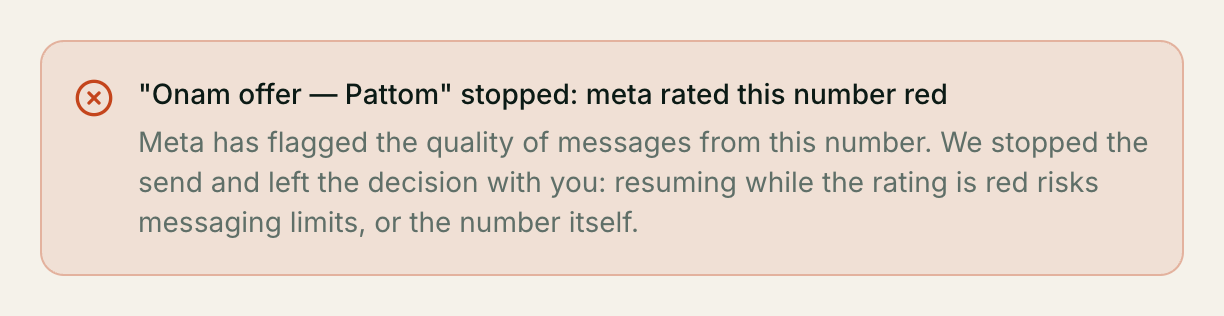
Check the reason recorded on it. A campaign the system stopped says so in as many words, and names what it wants you to decide:
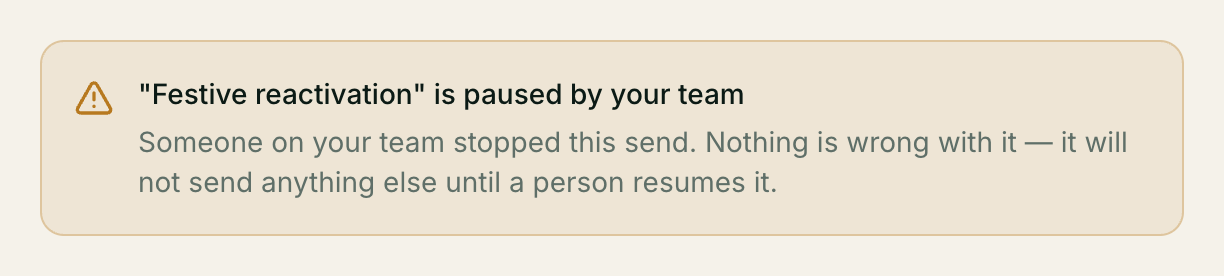
A campaign a person stopped says something different, and calmer:
The twelve the system can record:
| Reason, as the screen words it | What it means, and what to do |
|---|---|
| Meta rated this number red | Meta has flagged the quality of messages from this number. Read what went out before you resume — see above |
| That number is no longer a marketing number | The number was re-labelled while the campaign was running. A running campaign’s number cannot be changed, so relabel that number and resume, or start a new campaign on your marketing number |
| The WhatsApp number is gone | The connector was removed, switched off, or is no longer a WhatsApp number. Fix the connector, then resume |
| Broadcasts were switched off | Your account no longer has broadcasts. Your admin can restore it, and the send can then be resumed |
| This campaign has no header image yet | The template Meta approved has an image, video or document at the top and this campaign has no file for it — the upload never finished. Start the campaign again from New broadcast, choosing the file before you create it |
| The uploaded header file expired | WhatsApp keeps an uploaded file for about 30 days and this campaign’s has passed that. Upload it again on the campaign, then resume — nothing else about it has changed |
| Too many sends failed in a row | Twenty-five recipients in a row failed permanently, so we stopped rather than burning the rest of your list the same way. That pattern is usually the campaign, not the people. Check the report’s failure reasons before resuming |
| This number is temporarily paused | Deliveries from this number hit repeated errors, so it was paused for a short cool-off. Nothing for you to do — see below |
| Meta will not accept this template | Meta rejected the message template itself, or the values this campaign fills into it no longer match what was approved. Re-sync your templates, fix the campaign’s message, then resume |
| We can no longer sign in to this number | Meta rejected our credentials for this number — usually an access token that expired or was revoked. Nothing about the campaign is wrong. Reconnect the number under Integrations, then resume |
| We do not know this number’s daily limit | Meta did not tell us this number’s messaging limit, and we will not send a campaign while guessing it. Open the campaign and press Check this number with Meta — it asks straight away rather than waiting for the next scheduled sync. The campaign still stays paused until you resume it yourself; if Meta still gives no limit, reconnect the number under Integrations first |
| This send’s time zone is not recognised | The campaign’s sending hours are set in a time zone we cannot read, so we cannot tell whether it is the middle of the night where your list is. Find the campaign in the broadcast list and use Change send time to pick a time zone from the list, then save — Resume is withheld until the zone is one we can read, and this one never clears on its own |
In the campaign list the same distinction is one chip: a system pause shows its reason, a person’s shows Paused by your team.
Resuming is your decision, with one exception. This number is temporarily paused is a short cool-off after repeated delivery errors, and it lifts by itself — the campaign carries on when the cool-off ends, and resuming it by hand achieves nothing. Every other reason in the table above waits for you.
Our quality rating dropped and we do not know why
The rating is Meta’s and they do not explain it. What it reflects is blocks and reports from the people you messaged. In practice, look at: how recently those people last heard from you, whether they had any reason to expect the message, and whether the audience was people who had genuinely opted in. The campaign report shows the last one — a campaign where most of the list was suppressed for having no consent on record is a campaign that went to a thin slice of people who did opt in, which is the safe outcome, not the problem.
Can we go back to one number?
You can, and campaigns then have no number to send from. Order updates carry on exactly as before.
Still stuck? We answer support mail the same working day.
Email support