Your prepaid balance
How the wallet pays for calls and campaigns as they happen, what tops it up, and what changes when it runs out.
On a prepaid account, a call or a campaign message is paid for the moment it happens — the cost comes off your wallet balance as the call ends and as each message goes out. Your subscription and any add-ons still appear on your monthly invoice as usual; only usage that runs through the wallet is settled here instead.
Where to find it: open Billing and scroll to Wallet. The balance, how it’s moving, and the top-up box all live in one place.
Not every account is prepaid. If your account runs on ordinary metered billing instead, you will not see a Wallet section — see Billing and invoices for how your usage is billed instead.
Your balance
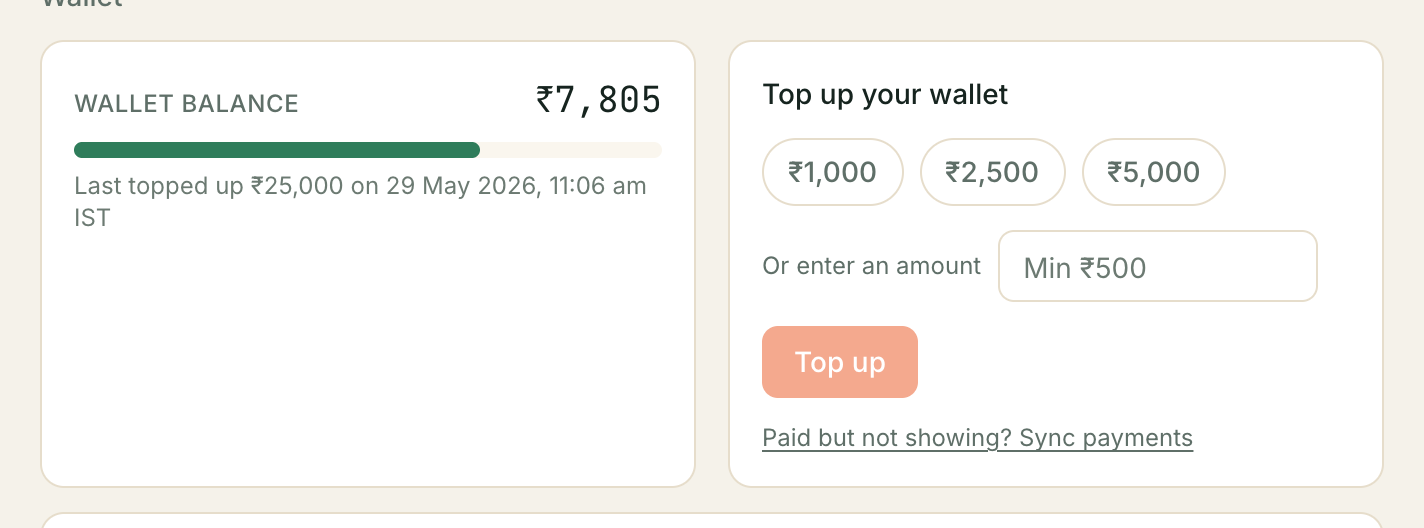
The number is what you have left to spend, right now — not a monthly figure, and not something that resets on your billing date. It only moves when a call happens, a campaign message sends, or you add money.
Under it, Last topped up ₹X on <date> — the amount and time of your most recent top-up, so you can tell a stale balance from a fresh one at a glance.
Topping up
Three quick amounts are offered — ₹1,000, ₹2,500 and ₹5,000 — or type your own in the box below them. The minimum top-up is ₹500. Press Top up and you’re taken to Razorpay to pay; the balance updates once Razorpay confirms the payment back to Kooday, which is normally within a few seconds.
⚠️ A payment that succeeded on your bank statement but hasn’t shown up here yet is not lost. Press Paid but not showing? Sync payments next to the Top up button — it asks Razorpay directly for anything Kooday hasn’t heard about yet, rather than you waiting or paying twice.
There is no auto-recharge. Nothing is ever billed to a saved card without you pressing Top up yourself.
What’s left in your wallet
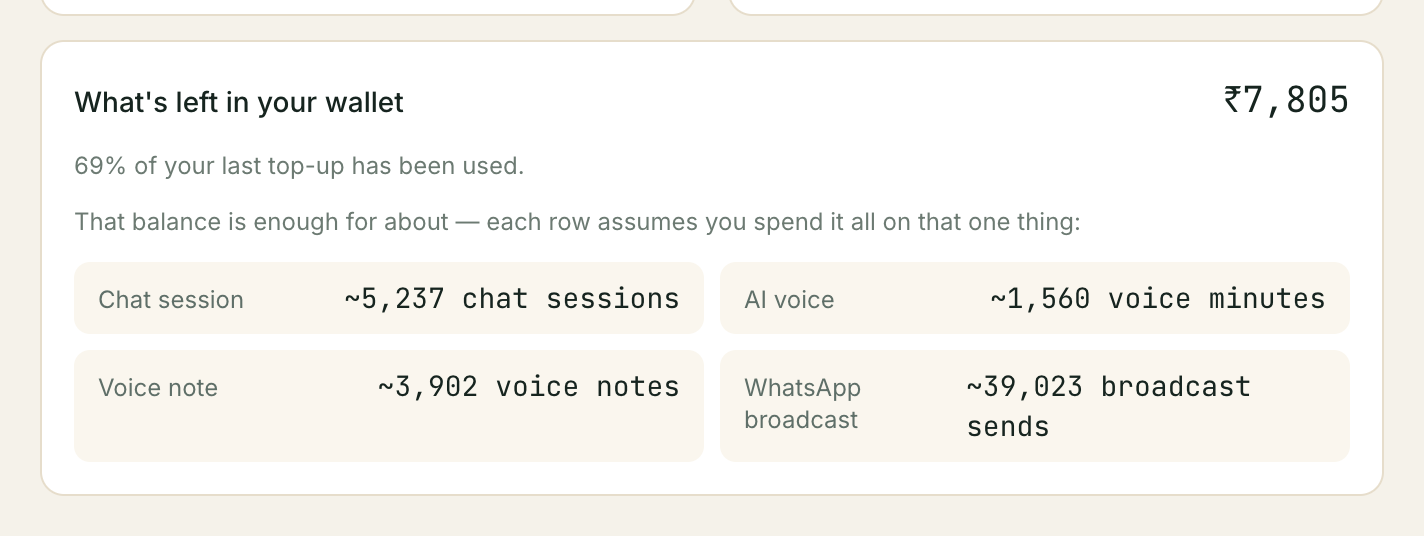
Underneath the balance, a second card translates the rupee figure into something easier to plan around: roughly how many chat sessions, voice minutes, voice notes or broadcast sends your current balance would cover if you spent it all on that one thing. It also shows what share of your last top-up has been used so far.
These four rows are alternatives, not a budget split. Your balance is one pool of money — it does not reserve a quarter of itself for each row. Spend it on any mix of calls, chats and campaigns and every row’s estimate falls together.
What happens at zero
Service stops rather than going into debt. With an empty balance:
- Outbound calls and campaign messages your assistant would otherwise make are not attempted.
- Inbound messages and calls are still answered — a customer reaching out to you is never turned away for a balance problem on your side.
There is no overage charge and no interest — topping up resumes normal service immediately, with nothing owed for the gap.
Troubleshooting
My balance didn’t move after a call I know happened
Give it a minute — the debit is written as the call’s cost is finalised, not mid-call. If it’s been longer than that, check you’re looking at the right bot: a call on a bot that isn’t on this tenant’s prepaid plan won’t touch this wallet.
I paid but the balance is still low
Press Sync payments next to the Top up button before assuming anything is wrong — most delayed top-ups are a webhook that hasn’t landed yet, not a lost payment. If it still doesn’t show after that, contact support with the payment time and amount.
The runway numbers look too high or too low
They’re a single-purpose estimate — “if you spent it all on this one thing” — using your account’s own rates. They will not match a month where you actually use a mix of channels, and that’s expected; see What’s left in your wallet above.
Where to go from here
- What each usage rate actually is — Billing and invoices.
- Adding a paid capability that draws on this same balance — Buying an add-on.
Still stuck? We answer support mail the same working day.
Email support