When does your assistant follow up?
Out of the box, never — why that is the default, when the quiet clock actually starts, which channels a chase can reach, and everything that makes the chasing stop.
Your assistant answers every enquiry the moment it arrives. Following up on the quiet ones — the customer who asked for a quote and then vanished — is a different job, and it works differently: it does not happen at all until you switch it on.
A brand-new account sends zero follow-ups. Not a conservative few — none. Until you put a cadence on a pipeline column, a customer who goes quiet is simply left alone, forever.
That default is deliberate, and this page exists because it surprises people. An assistant that follows up sends real WhatsApp messages and places real phone calls to your customers, under your name and your number. A feature like that must not switch itself on the day you sign up, before you have seen a single deal or chosen a single word. So it waits for you — and everything it does afterwards is bounded by the stops described further down.
Turning it on is a per-column setting on the pipeline board: Setting up your sales pipeline walks through the whole screen. This page is about what happens once you have.
The chase and the nurture are different things
Two separate motions reach a quiet customer, and a deal can have one or the other but never both at once.
| The chase | Reviving a stalled enquiry | |
|---|---|---|
| What it says | ”Just following up on your enquiry.” | Here is the comparison / spec sheet / photo you were asking about. |
| Who gets it | Any open deal on its stage’s follow-up cadence | Warm deals only, quiet for a week, with a file that fits |
| How often | Your stage cadence, up to the chase cap | 3 ever, at least 7 days apart |
| Template | kooday_chase | The four kooday_nurture_* templates |
| Switch | Let the assistant follow up outside the window | Let the assistant revive stalled enquiries |
When a warm deal qualifies for a nurture and has a suitable file, the nurture takes that follow-up slot instead of the chase — it is the same moment, with something useful in it. Hot deals and warm deals with nothing to attach keep getting the chase, which is the right tool for them.
Everything on the rest of this page — the quiet clock, the takeover, the STOP — applies to both. What nurture adds on top is on Reviving stalled enquiries, and every reason one was skipped is on Why a deal was not nurtured.
How a quiet enquiry reaches the board at all
Before anything can be chased, it has to become a deal.
Phone calls are read at the moment they end. Chat is different — a WhatsApp or website conversation has no hang-up moment, so your assistant treats a thread as finished once it has been quiet for about 30 minutes. Only then does it write the summary, and only then can your intake rules turn the conversation into a card on the board.
Two consequences worth knowing:
- Chat deals are not instant. A customer who enquires at 2pm becomes a card around 2:30 at the earliest, not at 2:01.
- A customer who replies after a long pause produces a second reading of the conversation, not a correction of the first.
The clock runs from the deal’s last activity — not the customer’s last message
“Message after 3 days” does not mean three days since the customer last wrote. It means three days since anything happened on the deal: a call, a message in either direction, a stage move, a note.
So a deal you dragged to another column this morning is not quiet, even if the customer has been silent for a week — your move reset the clock. Scheduling a follow-up is not itself activity, which is what lets a 2-day message and a 5-day call both fire on a deal that stays genuinely silent. What “quiet” means has the detail.
Where a follow-up can actually go
Each channel has its own rules about being contacted first, and they are Meta’s rules, not settings:
| Channel | Inside 24h | After 24h |
|---|---|---|
| free-form message | approved template only | |
| free-form message | nothing — no template exists | |
| Messenger | free-form message | nothing — no template exists |
| Webchat | — | no follow-up; we cannot reach a closed browser tab |
The window is 24 hours from the customer’s last message. Inside it, a business may write freely. Outside it, WhatsApp allows only a template Meta has approved in advance — and Instagram and Messenger allow nothing at all. That last cell is not a missing feature: those channels have no template concept, and no compliant way exists for an assistant to restart a conversation on them after 24 hours.
What that means in practice today:
- Follow-up messages go out on WhatsApp only. A deal that arrived from Instagram, Messenger or webchat can still be flagged to a person, and can still be called — but no chat message will chase it.
- Cadences are measured in whole days, so almost every follow-up message lands
outside the 24-hour window — which means almost every one is sent as the
approved template,
kooday_chase, with fixed wording and a Reply STOP line. Why your follow-ups need their own template explains the template, why it is worded the way it is, and what happens when it is missing. - Webchat is permanent. There will never be a webchat follow-up; there is no way to reach a browser tab that has been closed. The honest move for a webchat lead you care about is to collect a phone number while the conversation is live.
A cadence worth starting with
There is a right shape, so start with it rather than deriving your own:
| Rule | Days | Why |
|---|---|---|
| Message after | 2–3 | The first chase does most of the work; later ones add less each time |
| Call after | 5–7 | A voice on the phone reaches the people who ignore messages |
| Flag to a person after | 10 | If two attempts changed nothing, a human should decide, not a third message |
Three ideas behind the numbers:
- Front-load it. The value of a follow-up decays fast; two touches in the first week beat six spread over a month.
- Few touches, then stop. Your assistant enforces this whatever you configure — see the attempt cap below.
- End it deliberately. The flag-to-a-person rule is the deliberate ending: it puts the deal in front of you with a note, instead of letting the sequence trail off.
Put a cadence on the one or two columns where deals genuinely go quiet, not on every column. And keep the last column before Won set to You work it — a person is negotiating there, and automated chasing would cut across them.
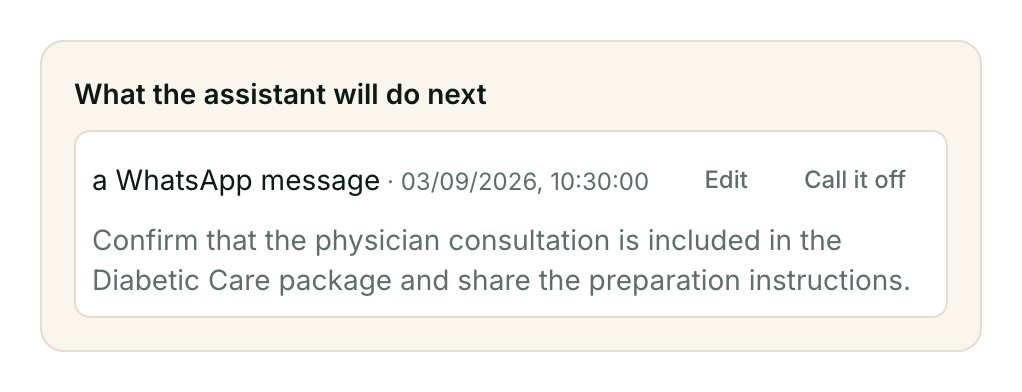
Once a cadence fires, the deal’s drawer shows exactly what’s scheduled and its exact wording — nothing goes out unreviewable:
What stops a chase
This is the half of the design that runs without you. Every one of these stops is automatic, and every one fails closed — if your assistant cannot confirm a message is allowed, it does not send it.
| Stop | Scope | Undone by |
|---|---|---|
| Deal marked Won or Lost | that deal | — (it is closed) |
| A person took the deal over | that deal | handing it back to the assistant |
| Deal snoozed | that deal, until the snooze ends | the snooze expiring |
| Column set to You work it | every deal in that column | changing the column setting |
| Pipeline switched off | everything | switching it back on |
| The customer said no — “we went with someone else”, “not right now” | that deal | the customer writing back |
| The attempt cap: three follow-ups, then stop | that deal | nothing — a new enquiry starts a new deal at zero |
| The customer opted out — stop, unsubscribe | every deal, every channel, and calls | only the customer, by replying START |
There is also one pacing rule rather than a stop: the same kind of follow-up never repeats within 24 hours on the same deal, whatever your day counts say.
The last three stops in the table are worth a sentence each, because they are the ones people ask about:
Your assistant reads the answer. A reply that is clearly a no — “no thanks”, “we went with someone else”, venda, nahi — stops the chasing on that deal and leaves a note asking you to decide what the deal becomes. The deal stays open: only a person ever marks a deal Won or Lost. If the customer later writes back, their new message supersedes their old answer and the assistant may resume — still within whatever attempts remain.
Three attempts, total. Messages and calls together, counted on the deal, and nothing resets the count — not a stage move, not a rename, not time passing. After the third attempt with no reply, your assistant stops and flags the deal to a person instead of sending a fourth. The cap is not configurable; a cap you could raise would not be one.
An opt-out is a different thing entirely. It stops promotional contact with that person — every deal, every channel, and sales calls too — and nobody at your business or at Kooday can reverse it; only the customer can, by replying START. When a customer asks you to stop covers all of it, including the difference between a plain STOP and STOP ALL.
One stop is a fault rather than a design: if the kooday_chase template is
missing or unapproved, out-of-window follow-ups are declined with the reason
no_chase_template and nothing is sent. See
the template page if follow-ups have stopped for
everyone at once.
And one stop applies to some customers and not others: the language. Your assistant learns a customer’s language from what they actually write to you. If it knows someone writes in Malayalam and your Malayalam follow-up template is not approved yet, it skips them rather than writing to them in English — a marketing message in the wrong language is worse than none, and it is one the customer did not ask for in the first place. The deal is left alone and the reason is recorded.
Everyone whose language you have not learned is unaffected. So is a brand-new lead who has never written to you: nothing about them names a language, so if your assistant is set to Malayalam they get the English follow-up rather than nothing at all. What a customer wrote outranks what you configured; your configuration is a preference, and a preference should not silence your follow-ups. The template page has the detail.
Your assistant can snooze a deal itself
“Deal snoozed” in the table above does not only mean a date you dragged in yourself. Your assistant reads every conversation, and when a customer is not saying no — they are saying not yet — it can snooze the deal on its own reading of that: “call me next month”, “let me check with my manager first”.
When it does, two things land on the deal:
- The chase pauses until roughly the date the customer implied — the same
snoozed_untila manual snooze uses, so every stop that respects a snooze respects this one too. - A line appears under the snooze date in the deal’s detail panel, headed Waiting on:, in the customer’s own words — “gets sign-off from her manager”, “the committee meets”. It only appears when the conversation actually named something concrete; most deferrals do not, and the line is simply absent.
Nothing about this needs a form. Your assistant is not asking a customer to pick a date from a list — it is reading what they already said, the same way it already judges whether a deal is hot, warm or cold. If nothing concrete comes up, nothing is captured; the deal just goes quiet in the ordinary way and the usual cadence resumes when the quiet period ends.
Waiting on is read-only. It is not a field you fill in — it is what your assistant heard, kept next to the date it implies, so a person reading the deal later knows not just when to expect movement but what to watch for.
Frequently asked questions
Why didn’t my assistant follow up?
Work down this list — every item is a designed stop, not a fault:
- No cadence is set. This is the answer for every fresh account: zero follow-ups is the default, per column, until you configure one.
- The deal was not actually quiet — any activity, including your own stage move or note, resets the clock.
- The column is set to You work it, the deal was taken over by a person, or it is snoozed.
- The customer already said no, opted out, or has had three attempts.
- The deal came from Instagram, Messenger or webchat — follow-up messages are WhatsApp-only today.
kooday_chaseis missing or unapproved — this one stops follow-ups for everyone, not one deal.- The customer writes in a language you have not had a template approved in. They are skipped rather than written to in another language. This one is per-customer, so it looks like “some follow-ups work and some don’t” — see What stops a chase above.
Why did the follow-up look different from what the AI said it would send?
Because of the 24-hour window. The wording your assistant drafts — and the brief you wrote on the column — can only be used inside 24 hours of the customer’s last message. Outside it, WhatsApp permits only the pre-approved template, whose wording is fixed: “{your business name} here — just following up on your enquiry…”. Since day-based cadences almost always fire outside the window, the template is what customers usually receive, whatever was drafted.
Can it follow up on Instagram?
No. Inside 24 hours of the customer’s last message Instagram allows free-form replies, but today’s follow-ups are measured in days and sent on WhatsApp only. And after 24 hours the answer is permanent: Instagram and Messenger have no approved-template mechanism, so no compliant follow-up exists there at all. An Instagram deal can still be flagged to a person, or called if you have a number.
Does a follow-up cost me anything?
It can. A follow-up sent outside the 24-hour window goes as an approved marketing template, and Meta bills template-opened conversations to your WhatsApp Business account — the rate depends on your country. Replies inside the window are free-form and free. A cadence set aggressively on a busy pipeline has a real Meta cost, which is one more reason the attempt cap exists. Calls cost whatever your calling minutes cost.
A customer asked us to stop — what do I do?
If they typed it to your assistant — stop, unsubscribe, take me off your list — nothing: it is already done, they got an immediate confirmation, and they are on your Opted out screen. If they told a person — on a call, in the shop — it can be recorded manually so the platform honours it the same way; see When a customer asks you to stop. Do not sit on it: every message sent after someone asked you to stop is a block or a report waiting to happen, and those are scored against your number.
Can I message someone who opted out?
Replying is fine — if they write to you, of course you answer, and your assistant does too. What is off-limits is initiating: promotional follow-ups, offers, re-engagement, and sales calls all stop, and Kooday will not send them. A plain STOP stops promotions only, so order, booking and payment updates keep flowing; STOP ALL stops everything. The one thing software cannot block is a person on your team typing an offer into a live reply — the No promotions chip on the conversation is there so nobody does that by accident.
How do I resume messaging someone who opted out?
You can’t — only they can. There is no button, for anyone, including Kooday support. If a customer says they want your messages again, ask them to reply START to your WhatsApp number. That is deliberate: the opt-out list is only worth anything if no campaign, salesperson or support ticket can talk it open. The customer replying START is the one record that proves they asked.
What’s the difference between a closed deal and an opt-out?
Scope, and who can undo it. A closed deal — or a deal where the customer said “no thanks” — is about one deal: the person is still your customer, still contactable, and you can open a new deal with them next quarter. An opt-out is about the person: every deal, every channel, calls included, and only they can lift it. Confusing the two in one direction loses you a customer you could have kept; in the other, it keeps messaging someone who told you to stop, which is how numbers get blocked, reported and eventually banned. The opt-out page has a side-by-side table.
Still stuck? We answer support mail the same working day.
Email support